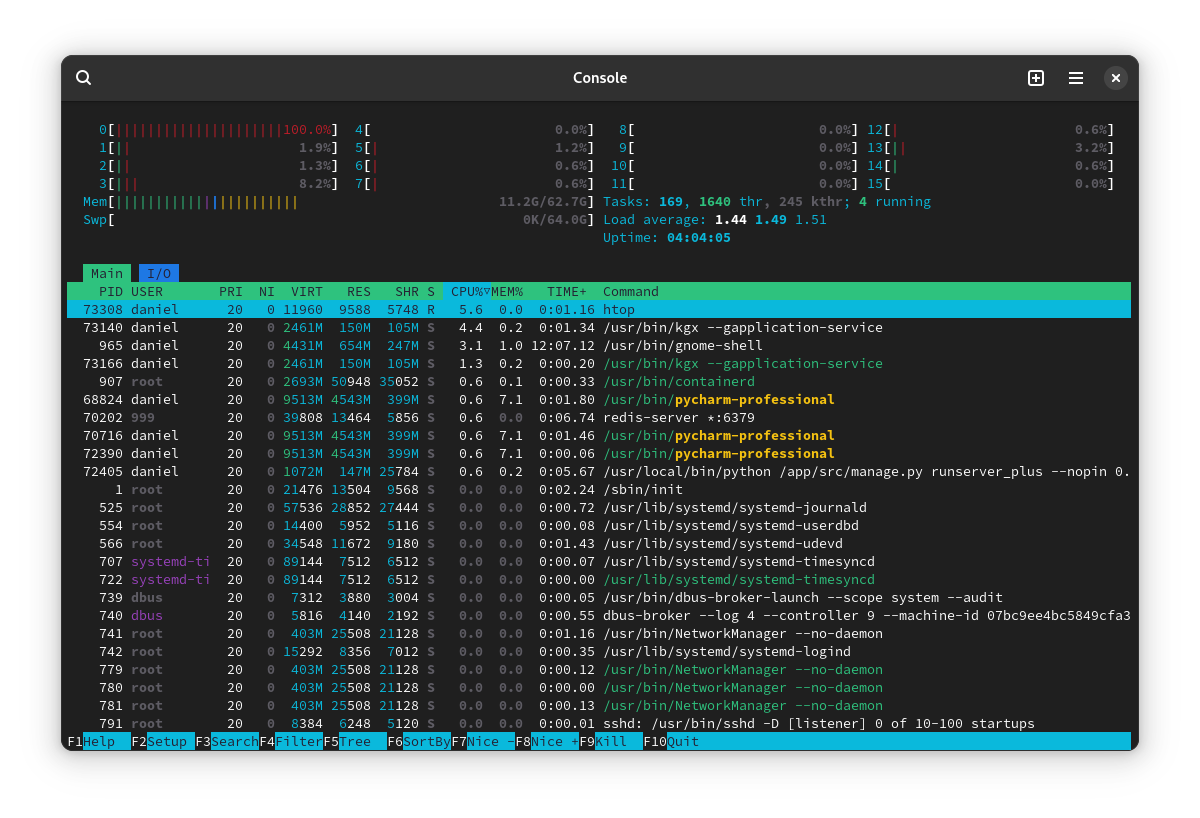

From time to time, often after I’ve restored from sleep or finished playing a Steam game, one of my CPU cores is pinned at 100% with no indication of what might be doing it. Running htop, btop, or GNOME system monitor all show the same thing: CPU0 at 100% while the rest are doing near-nothing, and no process in particular seems to be using those resources.
If I restart, it’s back to normal, and sometimes I can play a game in Steam or let the computer go to sleep and it doesn’t do this, but it happens often enough that’s annoying/confusing so I’d like to know if there’s a way to either (a) diagnose which processes are using which CPU cores, or (b) somehow “reset” the checking of these values to make sure that something’s not just being misreported.
This is a desktop system running Arch & GNOME.
It’s the Linux version of steam taking advantage of idle time to process shaders. It’s a critical part of making all those proton launched games working right. I wish it had better control for when to run it but it is what it is.
Just as a PSA, the feature is currently somewhat bugged and really should be avoided. For anything that’s not a low-end PC, your machine can handle the compilation during runtime easily and do it much faster.
For low-ends, it compiles so many unnecessary shaders (such as all workshop content that you might not even have), it often takes 10x longer to compile everything (which you have to recompile on every driver or game cache update) than just playing the game and watching a replay first or something.
deleted by creator
“Critical” as in not really needed.
It is very bugged and constantly runs even if it isn’t doing anything. It will also max out your disk IO for hours at a time with an HDD for larger game storage.
I have had it off for 1.5 years across 3 OS installs and have never had a problem with stuttering or shader related problems in that time. It is really not needed anymore for 95% of games since the Linux async solutions were merged.
Maybe if one uses severely out of date kernels it is critical
I blame Daniel
It’s probably Shader compilation. Funny enough the top result of my websearch is my own post/thread in Reddit 4 years ago. I had this exact same question on my old computer: https://www.reddit.com/r/linux_gaming/comments/kyf1wf/why_is_steam_using_one_core_always_but_doing/ Shader compilation is done from time to time in the background while Steam runs. This prepares games to run better.
Look if there is a process called
fosselize. That was the process name back then doing the Shader compilation.I’d never even heard of shader compilation. Apparently for the Steam Deck, Valve provides pre-compiled shaders for some games. What Is Shader Compilation and Why Does It Make PC Games Stutter?
Yes. That’s the benefit of having a single hardware to target. Same goes for consoles. They obviously know the hardware (like in Steam Deck’s case) and can precompile and ship it. There was plans (or just talks? not sure if this was ever realized) that users can download precompiled Shaders from other users, if its the exact same hardware.
deleted by creator
The problem with fosselize is that it’s currently bugged, and happens to precompile way more things than are needed, such as all workshop content that you might not have installed which takes a really long time + bloats up the shader cache in size. On anything that’s not low-end, it’s pretty much a waste of time since shader compilation is easily done on runtime.
Some issues on the things I’ve mentioned that Valve hasn’t seem to have responded yet: bloat, time
If you have a reasonably up to date mesa and use a Proton version with a new enough DXVK, DXVK can utilise Graphics Pipeline Libraries to link shaders just like a d3d11 driver on Windows would, eliminating stutter.
I believe shader precomp is used for some video codec edge cases though, so YMMV depending on the game.
Thanks for confirmation. After all, Shaders ARE actually shared; which is a good thing. Maybe for certain games its no longer needed to have Shader pre-compilation enabled. Because games does it themselves or maybe because the download of the compiled shaders from Valve (or collected ones) they come to conclusion the pre-compilation option is no longer needed? It’s hard to say if people do not explain their recommendation. It’s also not a straight forward and easy thing to test, so people can easily end up with wrong conclusions.
As for the annoying factor, every update requires pre-compilation (if enabled and only those games that need it off course). And if you have lot of games installed, it can be really annoying too.
I have been fighting with this for a long time, do you have an external monitor? I find this happens if I wake from light-sleep (not hibernation) while an external monitor is plugged in.
One of my ACPI interrupts just goes off the charts.
In one of the other comments, we worked out that it was definitely something to do with ACPI, but yes I do have an external monitor. This is a desktop system.
Disabling the interrupt did the job, but I don’t know why it’s happening. If this is related to the monitor, could this be an Nvidia thing?
I have a pretty old integrated Intel GPU. Happens to my Thinkpad pretty regularly.
Similar thing happens to me with my two monitor setup. No problem when I use single monitor. No problem when I use two monitor. However when I plugged out the second monitor or switch to single monitor with my script, the CPU starts doing random spikes on single cores in short intervals. Only a reboot fixes this.
Another quick tip for htop: the red color in the CPU bar means kernel stuff. In my case it was an issue with interrupts
Where can I learn what each colors means? Is it buried in
man htopsomewhere? Or in a website?F1 or h while in htop should show the guide
I had no idea! Thanks for the tip.
since your CPU has 16 threads (“cores” but not really cores, you probably only have 8 of that), if a process uses up all the capacity of a single core, that will have a 100/16 = ~6% cpu usage. In my experience looking for this really works… at least on windows, please don’t hurt me. it should on linux too, but there I don’t have it at such a visible place.
this may not work that much though when your system is under a higher load, and the process you’re looking for also has a higher CPU usage, like 30% or something.
in this case you’ll want to look for the cpu usage of the individual threads of processes with a higher cpu usage. if you have a process which has a thread with 6% cpu usage (in case of a 16 hardware thread cpu), then that process is at fault. by looking at the name of the thread you may even find out what is its purpose.at least on windows, please don’t hurt me
Nah fam, you’re hurt enough.
Is this why people use Zen?
No, it wouldn’t make any sort of difference.