-
I̶ h̶a̶v̶e̶ N̶V̶I̶D̶I̶A̶ O̶p̶t̶i̶m̶u̶s̶ a̶n̶d̶ I̶ h̶a̶v̶e̶n̶’t̶ b̶e̶e̶n̶ a̶b̶l̶e̶ t̶o̶ g̶e̶t̶ a̶n̶y̶ m̶e̶t̶h̶o̶d̶ o̶f̶ i̶n̶s̶t̶a̶l̶l̶i̶n̶g̶ N̶V̶I̶D̶I̶A̶ d̶r̶i̶v̶e̶r̶s̶ t̶o̶ w̶o̶r̶k̶. I̶ d̶o̶n̶’t̶ n̶e̶c̶e̶s̶s̶a̶r̶i̶l̶y̶ c̶a̶r̶e̶ a̶b̶o̶u̶t̶ t̶h̶e̶ f̶u̶l̶l̶ s̶w̶i̶t̶c̶h̶i̶n̶g̶ a̶b̶i̶l̶i̶t̶y̶ o̶f̶ t̶h̶e̶ O̶p̶t̶i̶m̶u̶s̶, a̶l̶t̶h̶o̶u̶g̶h̶ s̶u̶r̶e̶ i̶t̶ w̶o̶u̶l̶d̶ b̶e̶ n̶i̶c̶e̶. I̶ a̶l̶s̶o̶ h̶a̶v̶e̶ b̶e̶e̶n̶ u̶n̶s̶u̶c̶c̶e̶s̶s̶f̶u̶l̶ t̶u̶r̶n̶i̶n̶g̶ o̶f̶f̶ t̶h̶e̶ I̶n̶t̶e̶l̶ U̶H̶D̶ g̶r̶a̶p̶h̶i̶c̶s̶ (̶a̶s̶ a̶n̶ o̶p̶t̶i̶o̶n̶)̶. M̶y̶ c̶o̶m̶p̶u̶t̶e̶r̶ i̶s̶ a̶n̶ M̶S̶I̶ S̶w̶o̶r̶d̶ 1̶5̶ A̶1̶1̶U̶D̶, w̶i̶t̶h̶ N̶V̶I̶D̶I̶A̶ C̶o̶r̶p̶o̶r̶a̶t̶i̶o̶n̶ G̶A̶1̶0̶7̶M̶ [̶G̶e̶F̶o̶r̶c̶e̶ R̶T̶X̶ 3̶0̶5̶0̶ T̶i̶ M̶o̶b̶i̶l̶e̶]̶ 3̶D̶ g̶r̶a̶p̶h̶i̶c̶s̶. I̶ h̶a̶v̶e̶ i̶n̶s̶t̶a̶l̶l̶e̶d̶ u̶s̶i̶n̶g̶ t̶h̶e̶ D̶r̶i̶v̶e̶r̶ M̶a̶n̶a̶g̶e̶r̶ i̶n̶ M̶i̶n̶t̶, a̶n̶d̶ a̶l̶s̶o̶ m̶a̶n̶u̶a̶l̶l̶y̶. I̶ h̶a̶v̶e̶ c̶h̶e̶c̶k̶e̶d̶ a̶n̶d̶ I̶ a̶m̶ u̶s̶i̶n̶g̶ t̶h̶e̶ 5̶5̶0̶ d̶r̶i̶v̶e̶r̶, w̶h̶i̶c̶h̶ I̶ t̶h̶i̶n̶k̶ i̶s̶ s̶u̶p̶p̶o̶s̶e̶d̶ t̶o̶ b̶e̶ t̶h̶e̶ r̶i̶g̶h̶t̶ o̶n̶e̶.
-
I am having trouble transitioning to Linux where I am not able to simply navigate to additional hard drives contained in my laptop or attached via usb. I have my torrents on an external drive, and it keeps getting renamed, easystore somehow became “owned” by root and inaccessible, and I had to switch to easystore1 which was created in the same folder. After I switched, easystore1 became owned by root, and I had to switch to easystore2, which had been created.
In addition to this, I can’t browse to the external hard drive through plex media server or radarr/sonarr, it just doesn’t show on the menu. I know it’s a permission issue, but I don’t understand how that works.
I was happy up to a point, but my Linux installation is becoming what I was afraid of, a test showing me how little I know, and a time-eater that causes my wife to wonder what happened to her husband.
Please, I want to be free, but I don’t want to just say bye to my hard drives and my GPU. Help me, community. You’re my only hope.
-
You’re not the first person to not be able to make nvidia work on Mint. Here’s another one I found earlier today: https://www.youtube.com/watch?v=Xl6OBIQl_MI
-
Use gparted to assign label names to your partitions/drives, and you might need to edit /etc/fstab. More info here, and there are more such forum posts to read through: https://forums.linuxmint.com/viewtopic.php?t=344652
Overall, I’d say that Mint is the best distro to start with, but if you stumble on the few bugs they have, start looking elsewhere. I’d suggest you start by trying ubuntu 24.10 instead of mint.
Thanks for the info and the feeling of not being alone 😄
-
1. I just installed Linux Mint myself, coming from Nobara and I also had some issues with my NVIDIA GPU, as I also have a laptop with an integrated GPU (AMD) and a dedicated GPU (GeForce 3070ti). The issue was “Secure boot” being enabled in BIOS. It would somehow block the NVIDIA driver from initiating correctly.
If you look in the “NVIDIA settings” app and it look like this:
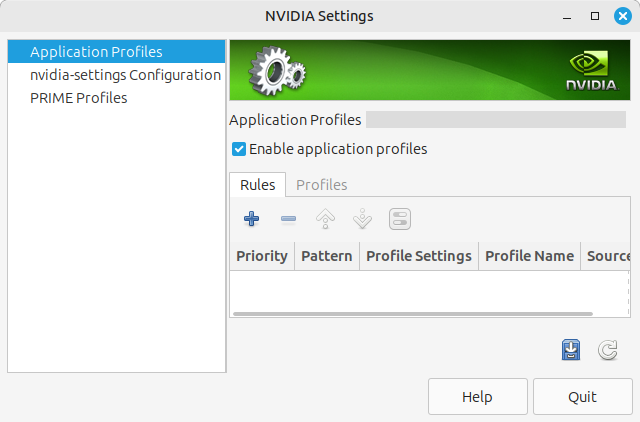
It means the NVIDIA driver haven’t initiated correctly. See if “Secure boot” is enabled. Disable it.
2. What about the app “Disks”? Doesn’t that do what you need?
This turned out to be key, along with another comment. I went BACK to my BIOS and sure enough, with all the changes I had left secure boot enabled. Disabled it and everything went so smoothly I felt a little embarrassed.
Thanks friend!
Good to hear! 😁
I turned secure boot off a while ago but I did update the BIOS which involved resetting to default and I should check that, thanks.
I’ll try disks, but I think the problem is NTFS formatting. Which sucks, but it’s understandable.
a test showing me how little I know, and a time-eater that causes my wife to wonder what happened to her husband.
Worth mentioning, but this gets much better with time. Part of it will go away as you learn new things, and is the same as learning any other new thing, be it using Linux, picking up an instrument, or learning another language. Hand in hand with this, you’ll also just get better at knowing where and what to look for to find answers to your problems, and how to ask for help in a way that includes all the relevant info and is more likely to get you a reply that sorts out your issue sooner.
It can definitely be overwhelming initially, but it’s always helpful to get familiar with the man pages and info pages, which are two forms of documentation that come built-in with your Linux install (along with other systems like the BSDs, if you ever wander over that way. OpenBSD man pages are amazing, fwiw, and may be more helpful at times for finding example commands). You can usually run
man commandto get a man page for most commands in your terminal, though not all. Info pages exist for GNU software, and can often be more thorough in their documentation.
man fstabfor example, will give you a general overview of how fstab works, and also include a list of other man pages at the bottom, under the heading SEE ALSO, that can be helpful in understanding related systems. If one of those entries is followed by a number in parentheses, you type the command slightly differently to access that section of the man page. For example, the fstab page suggests looking at mount(8), which you’d find with the command
man 8 mountinfo infoin a terminal will get you a helpful primer on how the info system works, which is good, as it can be somewhat more complex to navigate than man pages and uses a lot of Emacs keybindings.
Both can be a bit daunting when you first start out, but it’s worth at least being familiar with, as you can access them without any internet connection, helping you to do things and troubleshoot issues when you’re unable to go online, for whatever reason.
Finally, don’t overlook the utility of the various wikis out there. For Linux Mint, the Debian Wiki should be pretty decent, and the Arch Wiki is also generally pretty helpful, though may not always work for Debian/Ubuntu-based distros, since it may reference features in newer releases of packages than are available elsewhere. They’ll often include basic setup and configuration guides, as well as a troubleshooting section that outlines how to solve commonly encountered issues.
Can highly recommend
tldras a companion toman!
For what it’s worth, I actually had a lot easier time with NVIDIA graphics on Ubuntu and Fedora than Mint. And Kubuntu with the Plasma desktop was the easiest to get my partner converted from Windows without much tweaking.
You could try the booting the live CD and see if you’re able to get the graphics working more easily. And I’ve never seen that second issue on either Ubuntu or Fedora, so not sure what’s up there.
I’m not too happy with the direction Canonical is taking Ubuntu right now, but it typically has the most documentation for when issues come up and has a very healthy development cycle, so I still recommend it to most people as a starting place. To me, Mint has always been a little too opinionated and catering to the less technical and thus harder to tweak. Ubuntu kind of does it in a way that makes it easier to override the default easy-mode kind of stuff. Just a general observation from decades of Linux use, and may or may not be as true for the current versions.
I use Fedora with Plasma desktop on my other desktop/laptop devices because I prefer RHEL to Debian based stuff, probably just got used to it using CentOS and now Rocky for all my servers over the years.
A have never used mint and only used debian as a Workstation. If there is a permissions issue with an application, my first thought is how you installed you application?
When you say, you cant easily get tonthe content of a drive, what Desktop Environment do you us3 and what file explorer?
I installed Linux Mint from a live USB. I have installed applications via bash, software manager, and some even from the snap store.
I’m not sure what desktop environment Mint uses, I’m pretty sure it’s not KDE, and I have no clue about which explorer.
deleted by creator
It seems that you are not aware in what format you installed your apps.
Before you install an app, be aware what format it is, that you are installing. Is it a debian package installed via the apt cli or via some store gui? Is it a snap package? Is it an appimage? Is it a flatpak? All of these are different and can have different issues (advantages/disadvantages). Often the same app is available in multiple formats.
This is a great video explaining what formats are out there: https://youtu.be/1lLZ-59xH3Y
I’ll watch it, thanks
If you want stability and ease of use similar to Windows, I highly recommend Fedora Silverblue, Kinoite or Bazzite. Optimus is working (now, asus gfxctl was broken for two weeks due to a new kernel) every keyboard shortcut is working, and, for some unknown miracle, battery life is better than windows. I’m on a G14.
I don’t understand why Mint is chosen by people.
It just works for 99.99% of anything a regular user would want it to and is generally very easy to manage and update without a command line. I moved my parents who are non-technical and in their 70’s over to it from Windows 10. They like it so much they had me install it on their laptop as well.