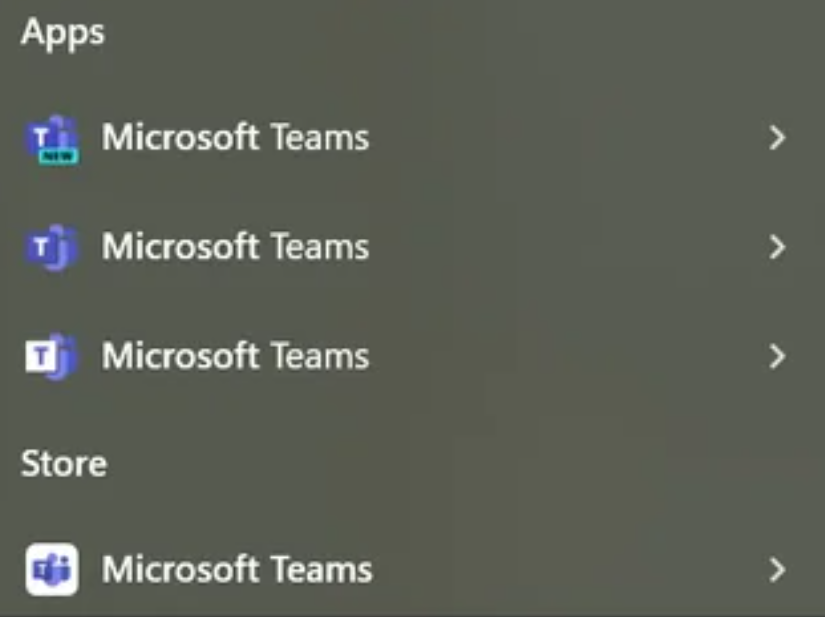
They should really make a Super Teams app
Follow it up with Teams 64.
Teams for Business. Teams 360. Teams series y.
Teams 98
Teams 98 Second Edition
New Super Teams U Deluxe
Teams app of the year edition
You forgot Teams Me.
Then Teams 64 with Knuckles
Teams one x
Teams Smash Ultimate
…wait
Then, inexplicably, Teams 8.
No, no, why wait? I am all for it.
I see your teams, and raise you: • Slack post-salesforce. • google hangouts • Google hangouts • increasingly, Discord.
Google is worse, but no one knows about it because no one uses it.
I think we’re on google chat and google meet (both separate for some reason) now. Before we had hangouts which could do both, and google duo, for just video calling, before we had allo, but before that we had google talk.
We have everything because there were different groups and changes along the way, and no one wanted to put in the effort or lose anything.
Now things are mostly in teams, but files are not on SharePoint but Box, making it even more ridiculous.
I loathe how messy my work laptop is with all these different variations of… Messaging.
Did you mean google hangouts or google chat or google meet or google voice or google messages?
Don’t forget Duo, Allo, and Spaces
Oh. I see the problem. You’re using Microsoft Teams. You’re supposed to be using Microsoft Teams. We sent out a PSA specifically telling users to only use Microsoft Teams, and we still have those idiots incessantly using Microsoft Teams.
New teams, or teams (new)?
Surpise its neither! Teams classic.
New Teams New Classic, but the old version.
The New Teams Classic (machine-wide installer)
Ducking machine wide installer…
Edit: hahahahhahaha autocorrect got me, but it’s too funny to change hahahaha
I’ve always heard Teams is crap but I’ve never used it. My company is switching to it though. What crap things do I have to look forward to?
are they switching to Teams or Teams?
Definitely Teams.
If you have any key depressed, for any reason, including but not limited to having taped a key (eg. ctrl) down, Teams will register you as “available”, rather than “away”.
I don’t understand. Why would I tape ctrl down?
So you can walk away from your desk, I assume.
Note that the trick doesn’t work on Linux, or at least hasn’t for me. My presence just doesn’t work and I’m always yellow lol
Microsoft still pretending Linux doesn’t exist I see.
But it also balances that by not automatically changing your status on random even if it should. Including setting status to ‘busy’ when you’re on another meeting, showing you offline when you’re available and so on. On our team the availability status is pretty much useless and we rely on chat responses on what the current actual status might be.
It’s the only program I regularly need to End Task and relaunch. If I turn my camera off and back on more than 5-10 times, it just starts crashing. Very frequently, others can’t turn their camera on at all, but only in Teams. There’s constant confusion about which Teams client people are using since Classic, New, Android, iOS, and web all have their own different bugs and missing features.
I think it works most consistently as a web app, but then you’re missing a boat load of features.
Good luck! You’ll need it.
I think it works most consistently as a web app
Looking at the browser’s developer console, you’ll notice that upon startup Teams makes so many goddamn requests (i.e. sends or receives data) that the goddamn Microsoft server tells it to shut up (i.e., sends a 429).
the performance is awfull. it updates all the time and after each update something breaks or some design change is made.
I think Teams as a chat and meeting app works just fine. But it tries to be too much. It’s the everything app from Microsoft: apart from chat and meeting you can browse sharepoint online, edit o365 documents including vision and project, integrate all other kinds of apps, it also shares your outlook calendar which you can directly edit, you can use it as a browser or adress book and I’m sure there is a ton more stuff you in Teams. But that also makes it bloated and slow and it regularly requires multiple updates within a day.
It’s handy, but they should streamline it a bit more. One of the first things I advise is to open office documents in the desktop app and have the teams folders as a shortcut in explorer.
You recive notifications for stuff you have already seen, sometimes stuff don’t send, sometimes they don’t arrive. Also you can download videos on teams for phone but not PC (or maybe the reverse, not sure)
It’s slow and consumes a lot of resources. The UX is pretty bad, but not worse than other Microsoft products.
I have to use it on my work computer. The most irritating thing for me is that it refuses to remember its previous monitor/location, and it restarts itself all the damn time doing updates or crashing, and then it pops up in the middle of a random monitor.
Otherwise, the functionality of it for communicating with coworkers is fine.
Three of those are “new”
Teams for Windows Live™
Teams for windows 3.1 live for workgroups™
Throw amazon chime in there.
I have multiple teams apps because they have different features!