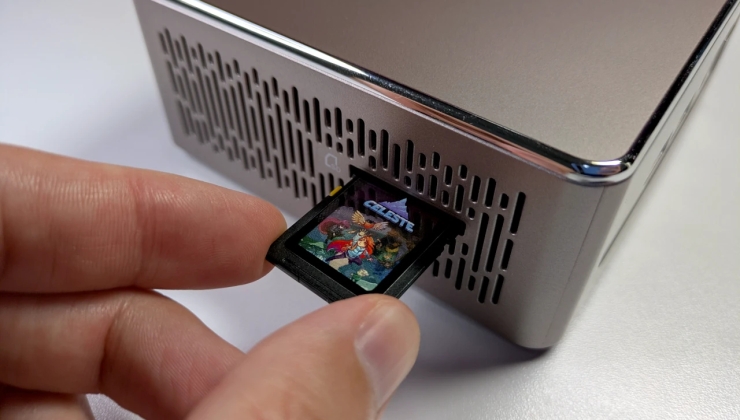
I was kicking around the idea of building an arcade machine at home and this might just be the one…
Now the real question - can you play old school platformers on it with split second precision that doesnt get interrupted by random shit on the OS? Even Nintendo’s SNES Classic was horseshit for games like Megaman. Or maybe I just suck now.
Software based emulators always have a bit of input latency. If you want the native experience you need an FPGA system.
I mean I pretty much do the same thing with my mister and NFC card readers.
this is the peak of “cool but functionally useless”
i unironically love it
Honestly I love the idea. I wonder if they’re planning on the obvious next step of adding a media player that will work similarly, turn it on with a disc or SD card inserted and it’ll play the DVD or music
It would be pretty cool to share games using SD cards like that, but there would hardly be anyone to share them with.
Was this supposed to sound so self depreciating? Lol …or maybe it’s the reflection of myself. 😐
What I meant is that in order to share these games, other people would also need such a device or at least an SD card reader, which most people don’t. It’s not because of you.
If only the builtin SD card readers from most computers could last more than 1 year… Either they’re all shit, or I’ve been really, really unlucky with them.
The readers in consumer-grade computers have been hit-or-miss for me. The contacts seem to either lack gold plating or develop a layer of tarnish.
I remember my 1st Surface Go’s microSD card reader being pretty good.
Why would I not want the savegames on the same card as the game? For me that doesn’t make sense.
Once upon a time I owned a GameCube memory card, specifically so that I could have my own save progression when visiting my friend’s house (who actually owned the GameCube and games). That may not really apply anymore?
On another note though, making the sd card read only means it will last significantly longer. Flash storage (like SD cards) have limited write cycles, so this preserves the games themselves while leaving the much smaller save files to be written somewhere else where they’re easier to back up.
Might be to prevent the SD card from running out of write cycles?
Kind of like an open-source Evercade, then?
Kazeta is Czech for casette. The Waterloo-based developer is Canadian but has a Czech name (Alesh Slovak / Aleš Slovák) and knows basic Czech so probably a descendant of Czechoslovak emmigrants.
This is really awesome! I’m 100% going to build a little system for this.
Maybe I’m just a young whipper snapper but I don’t get why people would want cartridges when freely copying the files to the main drive is an option since this would only work with DRM-free games. Cartridges were historically used instead of floppy disks or optical disks for DRM as you can make them basically impossible to duplicate. Even now the only reason Nintendo still sells cartridges is to allow the same game to be played in different devices with different logged in accounts while ensuring there is only one copy available between them.
And so with that in mind the basic idea is that you grab DRM free games (from stores like GOG), and pop them onto SD Cards to turn them into cartridges that Kazeta will detect.
So now instead of storing games on the computer itself, you have to go out of your way to put them on individual SD cards?
Also, is it strictly one game per SD card? That would be pretty wasteful of the available space for smaller games.
I noticed a lot of non-technical people using ChimeraOS/SteamOS getting lost in Steam’s complex menu structure and struggling with basic things like launching and closing games
I feel like someone who’s so nontechnical they can’t even figure out Steam’s UI, which is developed by a massive company with dedicated UX engineers and comprehensive QA for all their software, would probably also not be able to figure out installing a Linux OS, especially one that doesn’t boot into a normal GUI by default. It also assumes they will have a dedicated computer just for console style gaming, which nontechnical users probably wouldn’t bother with. Unless they plan on selling devices with their OS preinstalled as dedicated game consoles?
Also, you still have to interact with GOG to get the games. And also be able to find the app data direcrory GOG downloads games to in order to put them onto an SD card.
This also directly contradicts a quote later in the article: “Kazeta is definitely not for everyone. It requires a bit of work to get started”
I became disenchanted with digital storefronts and have come back around to appreciating physical media: game cartridges, CDs, DVDs
I have gotten more and more into collecting old physical games and systems and found them to be a much more pleasant experience than what modern gaming offers
Fair enough if you just want physical media in general, but I feel like people collecting physical media would specifically want ones branded by the company and not generic SD cards.
I have become more and more concerned with preserving my digital game collection for play in the future.
Bur there’s things in between digital storefronts and physical read-only media. Why not just have a special directory on the desktop that autodetects games copied into it? I assume that’s basically what happens when you insert an SD card with a game on it.
If you want to keep games atomic and prevent corruption of the directory structure, why not just support game directories in the form of tar or zip files and automatically mount them as a virtual filesystem?
keeping your games untouched and preserved forever
Don’t flash based storage put your data at risk of corruption if you leave it unpowered for too long? Having the games on the SSD you have powered every day sounds like it would be safer.
Though at least the flash’s write cycle limit wouldn’t matter with read only cards.
I’ve honestly been thinking about doing this myself. I’m so happy right now I can barely be contained!
But like, where do I download all my games from?
other device