
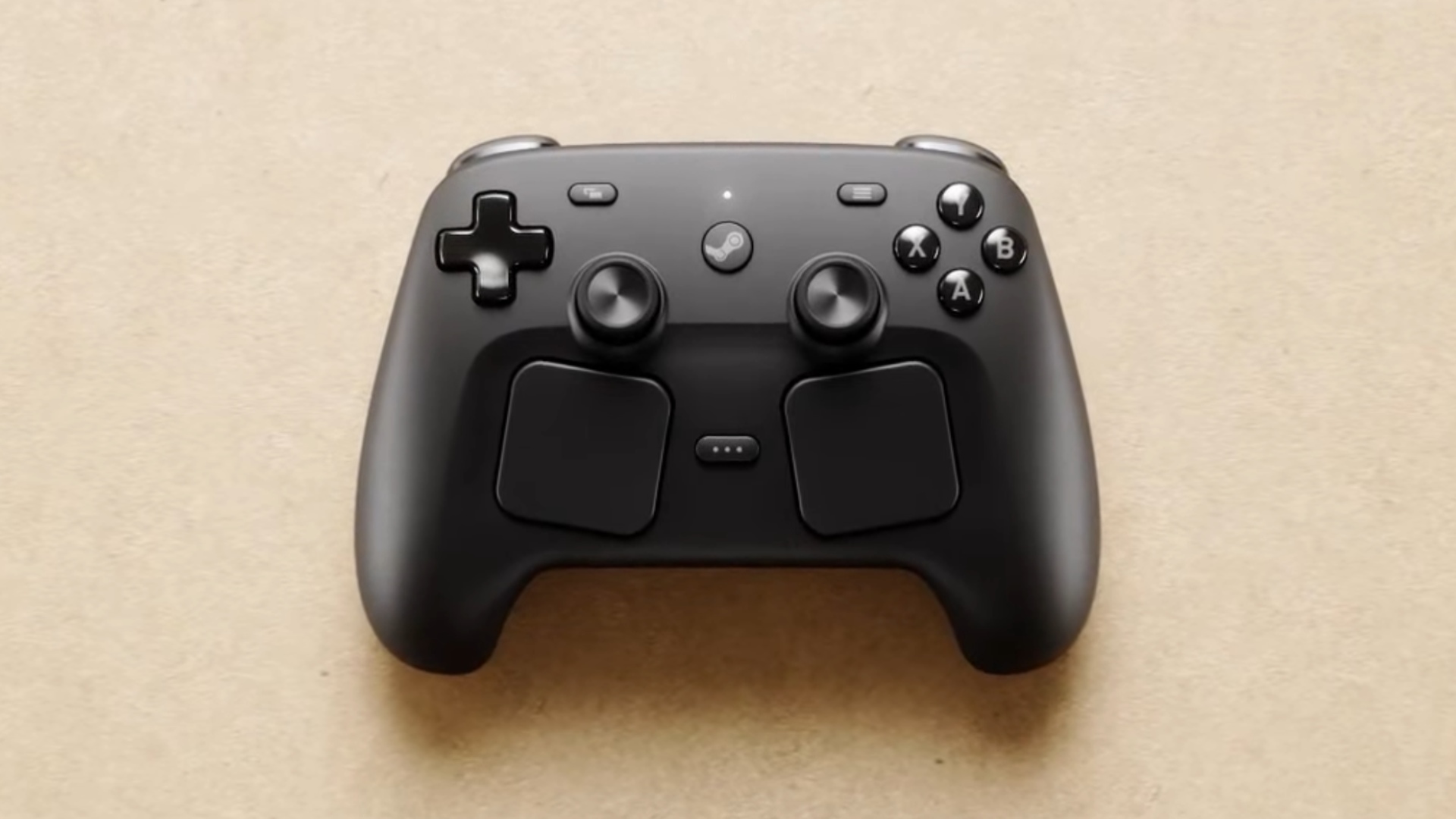
Leaker here is Brad Lynch, who generally seems reliable as a leaker for Valve software and products. He was also the source for the leaked renders of the steam controller.
I guess worth noting for Steam newbies:
The trackpads can be configured to act as basically any possible kind of input.
You can break them down into 4 way buttons, 8 way buttons, 2 buttons, one button… make them work as a joystick, or as a mouse… they click in a bit at multiple points…
So, if you prefer a different kind of thumbstick orientation, you can basically emulate it.
Literally all of the buttons on one of these things can be reconfigured to do a whole bunch of crazy shit, you can make macros, you can make it so that a little hud popup with scrollable selectable options pop up, you can make combos of key presses do different specific inputs, you can make a turbo function… etc.
Hell, you can make the gyros act as a mouse/joystick input, in several different modes, maybe only when you hold the aim button down, if you want that.
Anything you run through Steam can be made to work this way with the Steam Input system they invented for with the Steam Deck, the Steam Controller 2.0 is basically a shrunk down Steam Deck without the PC and screen.
EDIT:
There is also an onscreen keyboard functionality, which pops up a keyboard overlay, and then you use both trackpads as basically two thumbs on a smart phone, sort of.
So, if you’re playing a game that is 99% controller input, but has a few UIs popups where you get prompted to type in your name or something like that, or I guess even a chat box in an mmo, you can handle it with this.
Also also: Most/Many games come with preset default Steam Input layouts made by the developers. Also, Everyone who uses Steam is capable of basically uploading their control schema for any game to the cloud, and then you are capable of grabbing it and using it.
So, with some games, the developer provided inputs are good, sometimes users develop alternate schemes that are actually better/quite popular, or, maybe you could be the one to make a better config that people like!
I really like how rotating the camera works on the track pad - the right track pad works as a right joystick, but crucially has momentum. So I could do a quick swipe on the pad and the camera would continue moving for a moment after. It also allows fine speed control by changing how quickly I swipe. Once I got used to it, I could make very quick and accurate orientation changes. Much better than joystick imo where you have to hold it down, using up your thumb for a second or two while you turn. As a bonus, the track pad also could be used as buttons so your thumb is already in position to get mashing again.
After getting the Steam Deck 2 months ago and playing quite some time with it I used my Xbox One controller this weekend for this first time since it couple of months.
It felt weird. Just because the ergonomics of the Steam Deck are actually pretty good.
I thought about getting the Steam Controller (once it’s released). But I am still no fan of both sticks being in such a low position. The thing I really like about the Steam Deck is the fact, that all primary inputs (sticks, face buttons and d-pad) are positioned at the same height.
Somehow I never noticed that everything is nice and symmetrical until you mentioned. That… yeah, I think that’s even better than Sony’s design.
I don’t think the positioning will feel too different from the Deck honestly. Your hands are going to be closer together holding the controller and thus rotated more inward. It looks like Valve rotated the grips and stick/button/trackpad triangles to match this angle, hence the lower sticks and tilted trackpads. The ergonomics on the Deck, original Steam Controller, Index controllers, and Index headset have all been great, so I trust them here.
Oh snap it’s got the Playstation joystick config… I kinda want this to replace my dying DS4 I’ve repaired a few times now. I wonder how easy it’ll be to reach over those pads and touch the sticks
to reach over those pads and touch the sticks
Plz stop
Huh???
Removed by mod
The issue with the first one is that it loses basic controller functionality for the touchpads. Many games that come with controller support don’t work well on it without adjusting the controls.
The new steam controller should be fully functional as a standard controller, while having a lot more capabilities when the user can use them.
The trackpads on the deck are nice, it’s a great substitute for a mouse when you don’t have a mouse. But that’s all they are. Not a single game* has done anything to show off any greater potential. Binding ten keyboard keys into a dodgy ring menu is not a pleasant interface. I have never once wanted to use a trackpad as a redundant joystick input. I would like to freely pan around with one pad and point with the other - imagine that in a puzzle box game. Nothing can do this, the closest to an independent view control i’ve found is “bind mouse wheel up/down buttons to vertical swipes”.
Heck, I would like a water filled toy game where you just press the pads to squirt rings upwards, and it feels just a little bit haptically squooshy. Nobody has done even that much to make a game feel truly at home on the Deck with the deck’s controls.
The new controller looks nice, but I don’t see any reason for it to replace the lowest-common-denominator xbox style controller. Especially when there are some really good xbox clones with magnetic sticks being sold for super cheap.
*okay, there’s Aperture Desk Job. That hardly adds up to a game, it’s basically the manual that comes with the Deck controller. I’ve spent more time playing the PC Jr’s bios tutorial.
The Dishonoured games and Prey by Arcane Studios actually bothered to make proper Steam Controller configs and use the proper glyphs too, it makes a difference
deleted by creator
I want this controller, but I am so annoyed that no controller on the planet comes with separated directional buttons for the D-Pad. Accidental diagonal input is the bane of my existence. The Nintendo Switch Joy-Cons have separate buttons and I freaking love it! But the ONLY reason they did that is to allow them to serve as ABXY when held sideways. No “real” controller does this.
The only option I’ve found to achieve this is to get a PlayStation controller (PS4 or PS5), and mod it with a kit that separates the buttons under the faceplate. But the extra features of the Steam Controller sound too good to sacrifice just for that.
The only D-Pad I’ve ever actually liked is the 3DS (XL), because it’s so clicky and never caused accidental diagonal input. Seriously, how do people accept this crap?
So yeah, I really hope the D-Pad on this is clicky. I’ll probably be buying it either way.
Xbox Series controller dpad is very clicky and well defined, so accidental diagonal inputs aren’t a concern with that one.
There’s likely a number of other similar clicky dpads on the market nowadays, it’s been popularised again with quite a few retro handhelds.I only accept it because I have become used to it.
Otherwise, I do tend to agree with you for the pretty rare time I need to not go accidental diagonal.
In some use cases the 4 buttons instead of the D pad on the Joy Cons are amazing. As you say, you have no false diagonals. I really like them in Tetris for example.
But in 2D platformers or metroidvanias like Mario or Hollow Knight? Literally unplayable.
I don’t know what you mean, Hollow Knight is unplayable with accidental diagonals. Try attacking in mid-air while moving left, but then oops! Instead of an attack to your left, you do a pogo or an upwards attack. You miss your target, and you die.
After years of conditioning to play platformers with a D pad I just can’t play them with the Joy Cons. I played Hollow Knight with the 80BitDo SF30 Pro. Of course sometimes I died :D But I don’t blame the controller for that.
Interesting. I played Hollow Knight on Switch and joycons were my favorite option for this exact reason. The few times I tried with a Switch pro controller … did not go well. It’s too squishy, and I absolutely do blame the controller there! Presumably 8BitDo is much better and clickier.
Silksong I actually played on PC, with a keyboard. It was great for me, the biggest downside personally is the lack of rumble - I love haptic feedback. The game definitely plays better with a controller but the button layout on keyboard was totally playable.
Was about to recommend the same thing; I just couldn’t get anywhere on Silksong with a normal pad, had to set it up for a fight stick to have proper control.
Only got yourself to blame for diagonals with these bad boys:
https://www.8bitdo.com/arcade-controller-transparent-purple/
Of course, 8bitdo’s stuff is awesome, but Steam controllers are awesomer.
I mean, arguably… it isn’t a D Pad if its actually seperate buttons.
But anyway, with the Steam Deck, which the Steam Controller 2.0 is basically a scaled down version of, that doesn’t have the whole computer and screen… you can at least get after market uh… contact boards?
I’m not sure of the term, but like the internal platter board thing, that the dpad/abxy buttons actually physically connect to, with the trigger/switch mechanisms.
For my deck, I got a kit that replaces the original ones with ones that are much ‘clickier’, like a mechanical keyboard as compared to a membrane keyboard.
It has more tactile and also audio feedback, beyond just being more responsive… that was like $30 bucks or something?
For a while, it was the case that to do this kind of mod, you’d have to do your own solder, but I waited and eventually somebody in China somewhere started making ones that are pre-soldered, and just require an appropriate screw driver and some dexterity to install.
So… if the Steam Controller takes off, I’d say give it 6 months, and by then something similar will probably exist for it.
That’s a good idea actually!
deleted by creator
Gimme gimme gimme
I’m waiting years for this, even longer than the Steam Deck exists! I think that I buy it twice, one to use it and the second one as collection (and backup). :-) (Edit: typo, I didn’t meant unpacked)
Yay. My Playstation controller is at the point where it needs to be replaced. It’s got both battery capacity issues and charging issues. I’m hoping that the Steam controller lasts longer than the PS4 Pro controller b/c for the price that Sony charges, I’d expect those to last longer than mine has, especially given how little time I spend playing / using it.
I’ve been looking forward to the Steam controller. I was starting to think I should give up and just go get another PS controller. Granted, I’m sure I won’t get a first release Steam controller. They’ll have a limited quantity and wouldn’t surprise me if they’re gone by the time that the steam store has recovered from the outage and bugs that crop up every time a new product goes on sale.
Didn’t the PS4 Pro controller come out 10 years ago?
deleted by creator
I’m not sure when they came out. Why would it matter, though?
Why would t it matter? Does age not matter when it comes to how an electronic is expected to perform? I don’t expect to get more than 10 years Of perfect play out of any controller. Whether it stick drift or buttons wearing out or whatever the case may be. Nothing lasts forever even in perfect conditions. Not to mention the battery is the quickest thing the degrade anyhow. How often do you even see miniUSB cables?
Why would t it matter? Does age not matter when it comes to how an electronic is expected to perform? I don’t expect to get more than 10 years Of perfect play out of any controller.
You do know that not everybody who owns a PS4 controller bought them on day 1 when they were originally released, right? That it’s possible people like myself bought them much later than in 2016, correct? And you also realize that the problems I’m talking about – those didn’t start yesterday.
How often do you even see miniUSB cables?
Literally daily.
Ok, but you do realize that even if you didn’t purchase it day 1, that the battery begins decaying from the first day it’s created right? And maybe you’re not in the US, but at least where I’m at you have to go out of your way to purchase a miniUSB cable.
deleted by creator
I want
Maybe get some Decks back in, first…