
Beehaw
  • Communities
  • Create Post
  • search
    Search
  • Login
  • Sign Up
OrangePumkin ( OrangePumkin@piefed.nl )  to linux4noobs@programming.devEnglish · 4 months ago

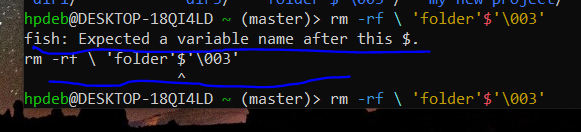
I am trying to get rid of this folder, but the result is saying that fish expects a variable name after this $. What does it mean ? And how do i get rid of this folder ?

objectstorage.eu-amsterdam-1.oraclecloud.com

message-square
24
link
fedilink
13

I am trying to get rid of this folder, but the result is saying that fish expects a variable name after this $. What does it mean ? And how do i get rid of this folder ?

objectstorage.eu-amsterdam-1.oraclecloud.com

OrangePumkin ( OrangePumkin@piefed.nl )  to linux4noobs@programming.devEnglish · 4 months ago
message-square
24
link
fedilink
alert-triangle
You must log in or # to comment.
  • comrademiao ( comrademiao@piefed.social ) 
    link
    fedilink
    English
    arrow-up
    5
    ·
    4 months ago

    Can you not rm -rf then tab and select the folder automatically formatted as needed?

  • AbidingOhmsLaw ( AbidingOhmsLaw@lemmy.ml ) 
    link
    fedilink
    English
    arrow-up
    4
    ·
    4 months ago

    Fish is the command line shell your using (similar to bash). Usaslly the $ symbol perceeds a variable name, hence the error. Do you have a folder with a $ in the name?

    • OrangePumkin ( OrangePumkin@piefed.nl ) OP
      link
      fedilink
      English
      arrow-up
      4
      ·
      4 months ago

      ‘folder’$‘\003’

      That’s the name of the folder.

      • ludrol ( ludrol@programming.dev ) 
        link
        fedilink
        arrow-up
        8
        ·
        4 months ago

        What does ls show?

        you can escape special charcters with \ something like \'folder\'\$\'\\003\' might work

        be careful with rm -rf as you might delete your entire disk if done badly. use some other command to test if it targets the correct directory like ls \'folder\'\$\'\\003\'

      • AbidingOhmsLaw ( AbidingOhmsLaw@lemmy.ml ) 
        link
        fedilink
        English
        arrow-up
        6
        ·
        4 months ago

        Yep as others have noted put a \ in front of each special character. The \ tells the system to treat the following character as a alphanumeric character in the string and not as a operator or a command. Since ', $ and \ are all special characters you will need a \ just before each when typing this name. Also as mentioned do this with a benign command like ls first to make sure your only acting on that specific directory or you might have a bad day.

        Edit: How the heck did you get some of those folder names? Looks like a script with incorrect variable/macro substitution made these.

      • Digit ( Digit@lemmy.wtf ) 
        link
        fedilink
        English
        arrow-up
        5
        ·
        4 months ago

        ‘folder’$‘\003’

        Oh that is unpleasantly fiddly to insert all the backslashes to escape the bits. Testing here, (fiddly to even make a dir called that, lol), for fun, instead of just pressing tab, … is it just the $ and the \ you need to escape? and the ’ are fine? Results here are inconclusive, not sure I managed to make a file with the same name, it showing here with extra outer '.

        Probably easier to just interactively… but yeah, in case needing to have it written for a script… probably easiest still to just press tab, to see how it arranges the escape syntax, and paste that into your script. ;)

        The fi in fish is friendly interactive, after all.

      • Successful_Try543 ( Successful_Try543@feddit.org ) 
        link
        fedilink
        arrow-up
        2
        ·
        edit-2
        4 months ago

        Are the hyphens apostrophes and the backslash part of the folder name too?

        If so, try \'folder\'\$\'\\003\' escaping the hyphens apostrophes ', the dollar sign $ and the backslash \.

        • OrangePumkin ( OrangePumkin@piefed.nl ) OP
          link
          fedilink
          English
          arrow-up
          1
          ·
          4 months ago

          d5sVJ1TsorJCfyZ.png

          • OrangePumkin ( OrangePumkin@piefed.nl ) OP
            link
            fedilink
            English
            arrow-up
            1
            ·
            4 months ago

            Do you see the folder with the strange name here ?

            • Digit ( Digit@lemmy.wtf ) 
              link
              fedilink
              English
              arrow-up
              2
              ·
              4 months ago

              Oh hey, seeing that has just given me another idea (not sure if anyone else mentioned this yet elsewhere further down in the conversation… but…)

              Tried just using a unique portion of the name that’s easy to type, along with asterisks for the rest? e.g. rmdir *old*00* (or rm -r if it’s not an empty dir you want rid of).

            • Successful_Try543 ( Successful_Try543@feddit.org ) 
              link
              fedilink
              arrow-up
              1
              ·
              4 months ago

              As the other commenters and I have mentioned, you should try escaping any of the special characters ', $, and \ by a backslash, i.e. \', \$ and \\

              • OrangePumkin ( OrangePumkin@piefed.nl ) OP
                link
                fedilink
                English
                arrow-up
                1
                ·
                4 months ago

                rm -rf command ?

                • Successful_Try543 ( Successful_Try543@feddit.org ) 
                  link
                  fedilink
                  arrow-up
                  1
                  ·
                  4 months ago

                  rm -rf \'folder\'\$\'\\003\'

        • OrangePumkin ( OrangePumkin@piefed.nl ) OP
          link
          fedilink
          English
          arrow-up
          1
          ·
          4 months ago

          Nothing happened.

        • OrangePumkin ( OrangePumkin@piefed.nl ) OP
          link
          fedilink
          English
          arrow-up
          1
          ·
          4 months ago

          There are no hyphens.

          • Successful_Try543 ( Successful_Try543@feddit.org ) 
            link
            fedilink
            arrow-up
            1
            ·
            4 months ago

            sorry, I mean apostrophes.

      • neo ( neo@feddit.org ) 
        link
        fedilink
        arrow-up
        2
        ·
        4 months ago

        I believe u should Type

        rm -r \'folder\'\$\'\\003\'
        

        Basically a \ interprets the following character as a character. With the ’ I’m not sure, so maybe

        rm -r 'folder'\$'\\003'
        

        could do the trick too

        Edit: correct code

        • OrangePumkin ( OrangePumkin@piefed.nl ) OP
          link
          fedilink
          English
          arrow-up
          1
          ·
          4 months ago

          VyxDqcxlLm2L7Xj.png

          After doing the step, the cursor simply came in the centre.

          • Successful_Try543 ( Successful_Try543@feddit.org ) 
            link
            fedilink
            arrow-up
            2
            ·
            4 months ago

            there is a space between your first \ and the ' that doesn’t belong there. (The backslash escapes the space, but not the apostrophe, that’s why it’s coloured red and not cyan)

            Press Ctrl+C and try again with the corrected command.

          • myster0n ( myster0n@feddit.nl ) 
            link
            fedilink
            arrow-up
            1
            ·
            4 months ago

            deleted by creator

  • sjohannes ( sjohannes@programming.dev ) 
    link
    fedilink
    English
    arrow-up
    4
    ·
    4 months ago

    Is this homework of some sort?

    By default, GNU ls will quote entries containing certain special or unprintable characters. For example, if a file name contains the space character, GNU ls will print e.g. 'hello world'. This quoting is done using Bash syntax.

    In Bash, 'folder'$'\003' (or $'folder\003') represents the text folder followed by octal byte 3. Because you use Fish instead of Bash, this doesn’t work­—it has a different syntax to specify unprintable/special characters.

    I can tell you how to refer to this file in Fish, but I hesitate to do it if it’s for homework. What I will do is point you to the part of the Fish documentation where this is (kind of) explained: in Fish for bash users#Quoting.

    • Successful_Try543 ( Successful_Try543@feddit.org ) 
      link
      fedilink
      arrow-up
      4
      ·
      4 months ago

      Would it help to use ls --literal --show-control-chars to find out if \003 is indeed the representation of a special character?

      • sjohannes ( sjohannes@programming.dev ) 
        link
        fedilink
        English
        arrow-up
        4
        ·
        edit-2
        4 months ago

        The default output itself is pretty definitive, assuming you are indeed using GNU ls and don’t have the QUOTING_STYLE environment variable set. https://www.gnu.org/software/coreutils/manual/html_node/Formatting-the-file-names.html explains all this (including your options) and more.

        $ touch $'folder\x03'
        $ ls --quoting-style shell-escape  # the default
        'folder'$'\003'
        $ ls --quoting-style c
        "folder\003"
        $ ls --quoting-style escape
        folder\003
        
  • sin_free_for_00_days ( sin_free_for_00_days@sopuli.xyz ) 
    link
    fedilink
    English
    arrow-up
    2
    ·
    edit-2
    4 months ago

    As others have said, tab-complete should be able to do it. If not, here are two other options:

    Is it the only “folder*” in the directory?

    $  ls *folder*
    ‘folder’$‘003’
    

    If you only have that, you should be able to use the wildcards to delete it:

    rm *folder*
    

    Another is just find the inode and delete using that:

    $  ls -li | grep folder
    5120013  .rw-rw-r-- user user  0 B  Fri Jun 19 21:09:02 2026 ‘folder’$‘003’
    
    $ find . -inum 5120013 -delete
    
    • OrangePumkin ( OrangePumkin@piefed.nl ) OP
      link
      fedilink
      English
      arrow-up
      1
      ·
      4 months ago

      I have uninstalled and reinstalled my WSL. Nothing exists now.

linux4noobs@programming.dev

linux4noobs@programming.dev

Subscribe from Remote Instance

Create a post
You are not logged in. However you can subscribe from another Fediverse account, for example Lemmy or Mastodon. To do this, paste the following into the search field of your instance: !linux4noobs@programming.dev

linux4noobs


Noob Friendly, Expert Enabling

Whether you’re a seasoned pro or the noobiest of noobs, you’ve found the right place for Linux support and information. With a dedication to supporting free and open source software, this community aims to ensure Linux fits your needs and works for you. From troubleshooting to tutorials, practical tips, news and more, all aspects of Linux are warmly welcomed. Join a community of like-minded enthusiasts and professionals driving Linux’s ongoing evolution.


Seeking Support?
  • Mention your Linux distro and relevant system details.
  • Describe what you’ve tried so far.
  • Share your solution even if you found it yourself.
  • Do not delete your post. This allows other people to see possible solutions if they have a similar problem.
  • Properly format any scripts, code, logs, or error messages.
  • Be mindful to omit any sensitive information such as usernames, passwords, IP addresses, etc.

Community Rules

  • Keep discussions respectful and amiable. This community is a space where individuals may freely inquire, exchange thoughts, express viewpoints, and extend help without encountering belittlement. We were all a noob at one point. Differing opinions and ideas is a normal part of discourse, but it must remain civil. Offenders will be warned and/or removed.
  • Posts must be Linux oriented
  • Spam or affiliate links will not be tolerated.
Visibility: Public
globe

This community can be federated to other instances and be posted/commented in by their users.

  • 1 user / day
  • 1 user / week
  • 35 users / month
  • 429 users / 6 months
  • 17 local subscribers
  • 4.44K subscribers
  • 212 Posts
  • 1.11K Comments
  • Modlog
  • mods:
  • PlutoParty ( PlutoParty@programming.dev ) 
  • BE: 0.19.15
  • Modlog
  • Legal
  • Instances
  • Docs
  • Code