

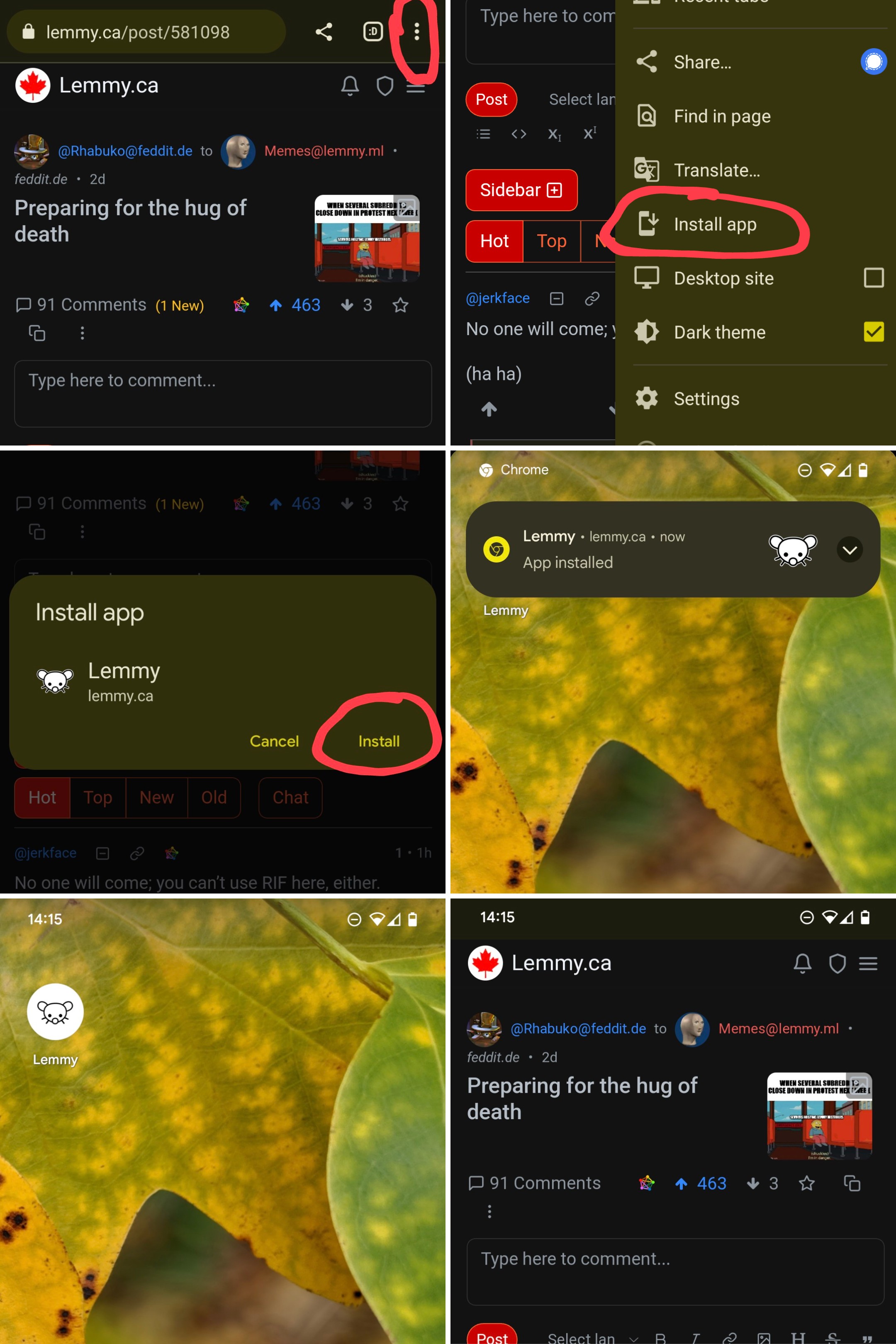
This works with Chrome. Knighthawk 0811 says it works with Firefox as well.
- Go to your Lemmy instance
- Open the browser menu
- Tap on “Install app”
- Tap “Install” in the dialog
- Tap on the newly created Lemmy shortcut on your home screen
This works with Chrome. Knighthawk 0811 says it works with Firefox as well.
Think this only works in Safari on iOS, not 3rd party browsers. I could be wrong.
I’m not sure, but since Apple doesn’t allow third party browsers (you can download Chrome, but it still uses Safari’s engine for example) it really doesn’t matter.
Even if you could do it on another browser it wouldn’t change anything. You’ll just get an icon that launches a website with no browser UI. Since all browser apps use the Safari backend, it’s a moot point.
I agree, I just remember I never saw the “Add to Homescreen” button in the Share menu when I tried it from Firefox some time ago. Maybe it’s changed since I last looked at it.
Lmao actually I was just in the App Store checking my updates and Firefox has an update and the notes say “You can now add website shortcuts to the phone Home Screen”
god damn it I have the WORST timing