Beehaw
  • Communities
  • Create Post
  • search
    Search
  • Login
  • Sign Up
ono ( ono@lemmy.ca )  to TechnologyEnglish · 3 years ago

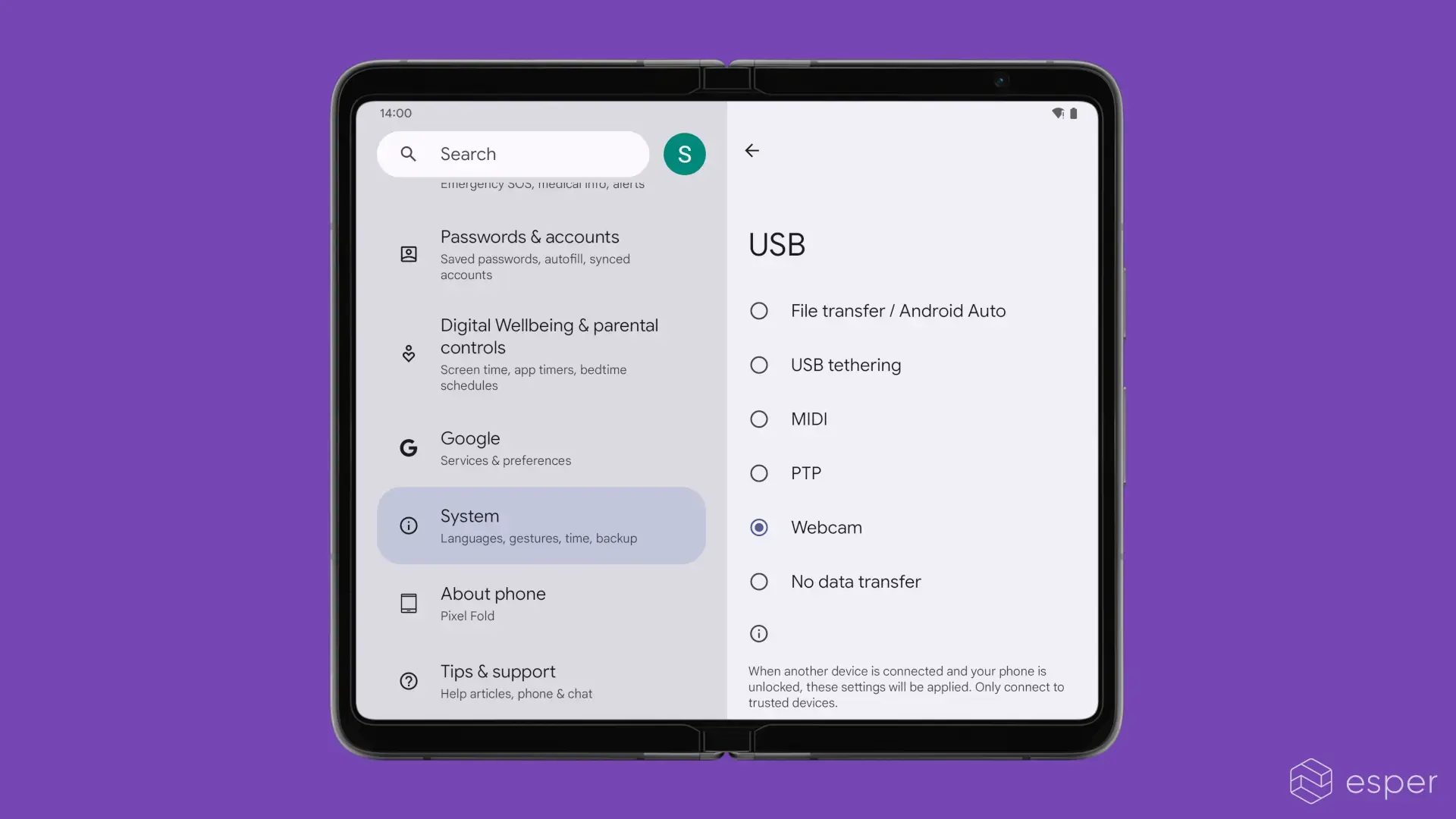
Android 14 adds support for using smartphones as a webcams

www.esper.io

external-link
message-square
33
link
fedilink
  • cross-posted to:
  • hackernews@derp.foo
199
external-link

Android 14 adds support for using smartphones as a webcams

www.esper.io

ono ( ono@lemmy.ca )  to TechnologyEnglish · 3 years ago
message-square
33
link
fedilink
  • cross-posted to:
  • hackernews@derp.foo
alert-triangle
You must log in or # to comment.
  • Sam Vimes ( SamVimes@beehaw.org ) 
    link
    fedilink
    arrow-up
    85
    ·
    3 years ago

    The fact that phones haven’t been able to to this easily/natively/what have you is wild. Similarly, the fact that you can’t use old tablets as external monitors without, in my experience of quite a few, significantly buggy software that’s got significant lag in the best of times, is pretty wild. Sure, the technical hurdles aren’t small, but damn.

    I’ve got a reasonably high end newish tablet (Galaxy S7+) that I can use miracast to use wirelessly as an extra PC monitor. It works quite well… if I’m near to a high quality new router. But can I just plug the tablet in and use it as a monitor with my laptop? Not remotely well.

    It’s been a year or two, maybe I should check for new software again.

    • ono ( ono@lemmy.ca ) OP
      link
      fedilink
      English
      arrow-up
      16
      ·
      3 years ago

      I hope we’ll see more of this as USB type C DisplayPort Alt Mode catches on.

      • HM King Charles III DG FD ( Flax_vert@feddit.uk ) 
        link
        fedilink
        English
        arrow-up
        1
        ·
        3 years ago

        Not available on Pixel

        • Esqplorer ( Esqplorer@lemmy.zip ) 
          link
          fedilink
          arrow-up
          1
          ·
          3 years ago

          Duet display works well

    • andrew ( andrew@lemmy.stuart.fun ) 
      link
      fedilink
      English
      arrow-up
      13
      ·
      3 years ago

      You can plug an iPad to a MacBook via usb c and use it as an external monitor and it works really well in my experience. Kinda makes me wonder if there isn’t a patent somewhere preventing it from wider use.

      • bdonvr ( bdonvr@thelemmy.club ) Banned
        link
        fedilink
        arrow-up
        5
        ·
        3 years ago

        It should work wirelessly as well

        • andrew ( andrew@lemmy.stuart.fun ) 
          link
          fedilink
          English
          arrow-up
          4
          ·
          3 years ago

          Yeah it does, but definitely not as well. I’ve had much better results with the USB connected directly.

          • abhibeckert ( abhibeckert@beehaw.org ) 
            link
            fedilink
            arrow-up
            1
            ·
            3 years ago

            Huh? It works perfectly without a wire.

            It doesn’t use your wifi router, it uses a direct (peer to peer) wifi connection between your computer and the tablet, which if they’re next to each other (e.g. a laptop and a tablet), will be faster than USB.

            If it’s a tower PC under a timber desk with a crappy wifi antenna, then yeah that won’t work as well as a cable. Timber is pretty effective at blocking wifi.

            • andrew ( andrew@lemmy.stuart.fun ) 
              link
              fedilink
              English
              arrow-up
              3
              ·
              3 years ago

              My statement is based on direct experience of janky frame drops between an iPad pro and a MacBook pro sitting next to each other on the couch. I suspected some potential interference issues so I went back to USB and it was buttery smooth again. Might not match your experience but in my environment that’s how it went down.

            • BCsven ( BCsven@lemmy.ca ) 
              link
              fedilink
              arrow-up
              1
              ·
              3 years ago

              Depends on USB gen. Because 3.2 can transfer data faster than WiFi 6

    • JazzDoggo ( JazzDoggo@lemmy.fmhy.net ) 
      link
      fedilink
      arrow-up
      7
      ·
      3 years ago

      Ive been using an app called SuperDisplay. It allows to connect an android device through cable. It only requires to install their software on the PC first. It’s a paid app with 3-day trial, so you can test how it works.

    • atocci ( atocci@kbin.social ) 
      link
      fedilink
      arrow-up
      6
      ·
      3 years ago

      I hate that this is only just now coming in Android 14. I have old phones I would love to be able to set up as webcams for 3D print monitoring, but of course they haven’t been updated in years and will never get this feature.

      • 𝒍𝒆𝒎𝒂𝒏𝒏 ( lemann@lemmy.one ) 
        link
        fedilink
        arrow-up
        8
        ·
        3 years ago

        This is already possible - there are apps that will let you use any android phone as an IP camera, which you can then view from any other computer or phone on the same WiFi/network

      • redcalcium ( redcalcium@lemmy.institute ) 
        link
        fedilink
        arrow-up
        3
        ·
        3 years ago

        The real blocker here is the kernel must be compiled with UVC support, which is only enabled by default on many devices since Android 12. Custom ROM could enable this on older android devices, but I doubt it’ll happen because custom ROM usually reuse the device’s kernel instead of compiling their own version of kernel.

      • andyMFK ( andyMFK@reddthat.com ) 
        link
        fedilink
        arrow-up
        1
        ·
        3 years ago

        there are many apps that will let you do this. I use an app called IP Webcam

        • atocci ( atocci@kbin.social ) 
          link
          fedilink
          arrow-up
          2
          ·
          3 years ago

          Sure, I tried the same app actually, but it needing to go over the network was a pretty big drawback. This sounds like a wired connection that will be recognized as a camera by any PC.

    • Skull giver ( skullgiver@popplesburger.hilciferous.nl ) 
      link
      fedilink
      arrow-up
      4
      ·
      edit-2
      3 years ago

      [This comment has been deleted by an automated system]

    • muhyb ( muhyb@programming.dev ) 
      link
      fedilink
      arrow-up
      2
      ·
      3 years ago

      A Philips phone did that and it wasn’t even Android, probably like 15 years ago.

    • jmcs ( jmcs@discuss.tchncs.de ) 
      link
      fedilink
      arrow-up
      2
      ·
      3 years ago

      Lenovo has a few tablets with HDMI input, but yeah it should be a basic feature over usb-c for all devices.

    • TheOakTree ( TheOakTree@beehaw.org ) 
      link
      fedilink
      arrow-up
      1
      ·
      3 years ago

      I would suggest trying spacedesk. It’s not great, but when it works it even works over USB.

  • 🇰 🌀 🇱 🇦 🇳 🇦 🇰 🇮 🏆 ( Kolanaki@yiffit.net ) 
    link
    fedilink
    English
    arrow-up
    19
    ·
    3 years ago

    Well… this is gonna make one of the only apps I ever bought obsolete.

    • jarfil ( jarfil@beehaw.org ) 
      link
      fedilink
      arrow-up
      3
      ·
      3 years ago

      Bought? I’ve been using this one for like the past 10 years:

      https://play.google.com/store/apps/details?id=com.pas.webcam

      • 🇰 🌀 🇱 🇦 🇳 🇦 🇰 🇮 🏆 ( Kolanaki@yiffit.net ) 
        link
        fedilink
        English
        arrow-up
        1
        ·
        edit-2
        3 years ago

        The one I paid for (iVCam) works with OBS and Twitch, can do full 4K@60fps and stuff. I had never seen a free one that worked with my other apps, allowed even just full HD, and didn’t have a watermark. I definitely would have preferred something totally free tho.

        IP Camera looks like it only works with VLC or a browser according to its description. The built in support for it on Android might not actually do what I want either… 🤔

        • jarfil ( jarfil@beehaw.org ) 
          link
          fedilink
          arrow-up
          2
          ·
          3 years ago

          It’s arguably an old app (est. 2010), but I think OBS should be able to consume a VLC streaming source?

          No idea about the max rez@fps, my main uses for it over the years have included things like tying an old phone to a rope and lowering it into a pipe to locate a stray kitten, attaching it to a RC car for a “VR experience”, and using it as an enhanced mirror to take a splinter out of my foot 🤷

        • CjkOvPDwQW ( CjkOvPDwQW@lemmy.pt ) 
          link
          fedilink
          arrow-up
          1
          ·
          3 years ago

          Basically see the wiki below but I would like to add is Linux only.

          Don’t know if there is something like v4l2loopback for windows.

          https://github.com/umlaeute/v4l2loopback/wiki/FFmpeg#using-an-android-device-as-a-webcam

    • gnufudgecc ( gnufudgecc@beehaw.org ) 
      link
      fedilink
      arrow-up
      2
      ·
      3 years ago

      Main reason why ALWAYS hesitate buying apps and services online.

  • lichtmetzger ( lichtmetzger@feddit.de ) 
    link
    fedilink
    arrow-up
    18
    ·
    3 years ago

    There’s been an app for that for ages: DroidCamX.

    https://play.google.com/store/apps/details?id=com.dev47apps.droidcamx

    • candle_lighter ( candle_lighter@lemmy.ml ) 
      link
      fedilink
      English
      arrow-up
      20
      ·
      3 years ago

      But now it’s native! :D

  • bdonvr ( bdonvr@thelemmy.club ) Banned
    link
    fedilink
    arrow-up
    11
    ·
    3 years ago

    Probably a response to Apple’s “Continuity Camera”, which is pretty slick and seamless

  • 18107 ( 18107@aussie.zone ) 
    link
    fedilink
    arrow-up
    8
    ·
    3 years ago

    It’s about time.

  • Blackmist ( Blackmist@feddit.uk ) 
    link
    fedilink
    English
    arrow-up
    4
    ·
    3 years ago

    Makes sense, especially now working from home is a thing that we’re allowed to do.

  • Chemical Wonka ( chemicalwonka@discuss.tchncs.de ) 
    link
    fedilink
    English
    arrow-up
    2
    ·
    3 years ago

    and how about Desktop Mode on older Google Pixels, Google?

  • Artemisia ( artemisia@beehaw.org ) 
    link
    fedilink
    arrow-up
    1
    ·
    3 years ago

    Native bluetooth trackpad would be nice too.

Technology

technology

Subscribe from Remote Instance

Create a post
You are not logged in. However you can subscribe from another Fediverse account, for example Lemmy or Mastodon. To do this, paste the following into the search field of your instance: !technology@beehaw.org

A nice place to discuss rumors, happenings, innovations, and challenges in the technology sphere. We also welcome discussions on the intersections of technology and society. If it’s technological news or discussion of technology, it probably belongs here.

Remember the overriding ethos on Beehaw: Be(e) Nice. Each user you encounter here is a person, and should be treated with kindness (even if they’re wrong, or use a Linux distro you don’t like). Personal attacks will not be tolerated.

Subcommunities on Beehaw:

  • Free and Open Source Software
  • Programming
  • Operating Systems

This community’s icon was made by Aaron Schneider, under the CC-BY-NC-SA 4.0 license.

Visibility: Public
globe

This community can be federated to other instances and be posted/commented in by their users.

  • 143 users / day
  • 1.25K users / week
  • 2.2K users / month
  • 5.28K users / 6 months
  • 5.11K local subscribers
  • 43.6K subscribers
  • 6.39K Posts
  • 107K Comments
  • Modlog
  • mods:
  • Chris Remington ( remington@beehaw.org ) 
  • alyaza [they/she] ( alyaza@beehaw.org ) 
  • TheRtRevKaiser ( TheRtRevKaiser@beehaw.org ) 
  • gyrfalcon ( gyrfalcon@beehaw.org ) 
  • rs5th ( rs5th@beehaw.org ) 
  • coldredlight ( coldredlight@beehaw.org ) 
  • Leigh ( SemioticStandard@beehaw.org ) 
  • TheRtRevKaiser ( TheRtRevKaiser@kbin.social ) 
  • BE: 0.19.15
  • Modlog
  • Legal
  • Instances
  • Docs
  • Code