
You must log in or # to comment.
Firefox is actually one of the recommended browsers, if you were to click on that link. Twitch just has some issues sometimes
Differing experiences might mean that Twitch is performing A/B testing on blocking Firefox.
Seems to be working OK for me on FF with Ublock and Privacy Badger running.
Same here
Change user agent. Log in, opting to stay logged in for 30 days. Change user agent back.
That’s my routine with LibreWolf.
I also believe they don’t like a particular security setting present on FF based browsers, though I don’t recall off the top of my head which one.
Aite maybe this is a dumb question, but what is “changing the user agent”?
When your browser connects to a website, it will tell the webserver what type of browser you are using in the HTTP headers. This can be used for serving a special web page for browsers with quirks, or it can be used to block certain browsers.
It may look something like this:
User-Agent: Mozilla/5.0 (X11; Linux x86_64; rv:123.0) Gecko/20100101 Firefox/123.0But you can use an extension like this one to spoof your user agent and send out one that corresponds to a chromium browser.
Grazie for the link
Something you shouldn’t have to do in order to use the internet.
There are browser plugins that let you change your user-agent request header to masquerade as another browser (e.g., Chrome).
Thanks!
User-Agent is a string of information that browsers use to identify to a site what browser, version, build, etc you are using.
You can download FF extensions that allow you to spoof a different user-agent, making the site think you’re instead using Chrome, as an example.
Thanks!
I also believe they don’t like a particular security setting present on FF based browsers, though I don’t recall off the top of my head which one.
Looks like it’s tracking of course
You need to disable resist fingerprinting. It’s annoying, but you can reenable it after you’ve logged in
That’s the solution if you immediately tried to login and it didn’t work.
Twitch login has in general very misleading error messages. The exact same message with unsupported browser also appears if you take too long to login
No, you need to email twitch that they have a bug.
And boycott them if they’re intentionally trying to harm marginalized folks.
This is a cookies/tracking issue, not a Firefox issue.
If you set it to allow tracking, it will let you login, and you can disable tracking again after and it will remember you.
deleted by creator
Anecdotally, it’s still working for me. Using uBlock Origin, logged in with a Twitch account.
What does the “recommend browser” link point to? Is it this page, which lists Firefox as a supported browser? https://help.twitch.tv/s/article/supported-browsers?language=en_US
Everyone boo this service! BOOOOOOOOOOO!
Please don’t post pictures of text without transcribing the words
the title describes the screenshot entirely
Fuck blind people who need to google error messages, right?
/s
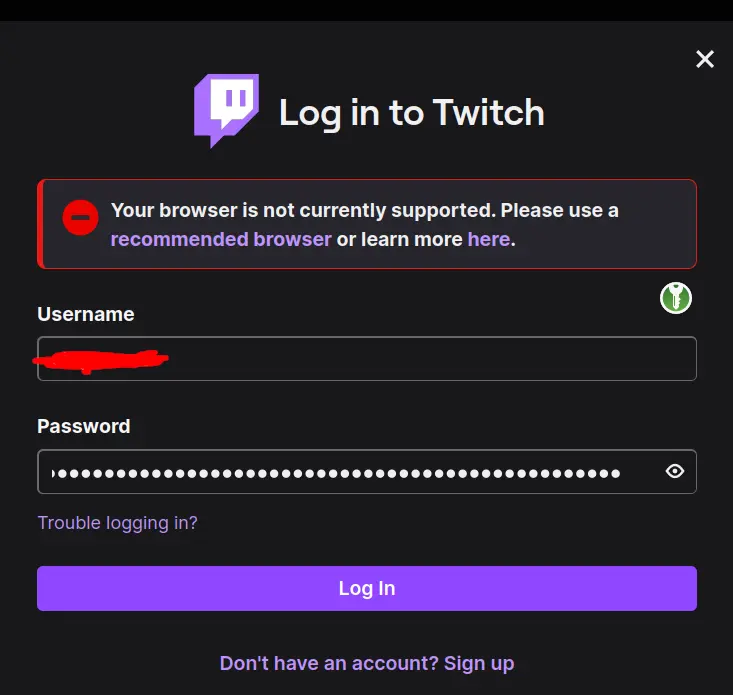
Upper screen: [Twitch Logo] Login to Twitch
Box with error notice: Your browser is currently not supported. Please use a recommended browser or learn more here.
Then there is just a standard login form
@TonyTonyChopper @library_napper It does not.
deleted by creator
Sorry I’m blind, and I cannot see the image. Would you mind telling me what you posted?
Sorry I’m a fucking monkey, can you translate your comment to monkey noises?
deleted by creator
Now that is a long password lol
Idk someone could probably brute force it in only a few trillion years, I’d make it longer if you plan to be using Twitch long-term.
You assume the person would never change the password. Someone with that long password is probably security concerned and is likely to change it after some time, even if its once in a year.
Yeah but you’d have to write it across like, 10 post-it notes along the top of your monitor. That’d get expensive!
Or just use a password manager. Then you only need to store one password across 15 post-it notes.
NIST does not recommend changing passwords. Its usually a bad practice
Why is changing passwords bad practice? What is the reasoning behind this? Changing passwords is highly recommended. There are many reasons why one should do this. Found this article: https://www.linkedin.com/pulse/why-passwords-must-periodically-changed-roger-grimes and don’t agree. The argumentation seems like if you have to remember all passwords, but totally ignores password managers.
NIST used to tell orgs to require password rotation. Some years ago they changed their recommendation with an explanation that it adds not security benefits while it encourages users to write down or use shittier passwords.
Yes, as I said, that is with the assumption if people do not use password manager and get lazy. Then I can see this argument being true. But with such long and complicated random passwords on many different services (like I do), it’s expected to use password managers and only remember a single password. Therefore this is the preferred method over bad passwords, which are not changed frequently, as the NIST recommends. I do not agree with that.
If your password don’t overflow the input field, its not long enough
When I got that message I just refreshed the page and tried logging in again and it worked.
Does it still let you sign in? I am currently signed in and it works
No, I tried to log in so i can change my password
Just a comment: IMO it’s not worth using strong passwords on which you depend on privative/unknown security platforms. Who knows how many times they get hacked or have backdoors? Unless they specify they only store the hash I refuse to sacrifice one of my strong passwords.
Edit: To all talking about password managers. I don’t believe in single point of failure as a way to go. The fact that i’ve to explain that xd…
You should use randomly generated passwords from a password manager, there is no short supply of strong random passwords.
Waste one of my 2272657884496751345355241563627544170162852933518655225856 possible 32 character passwords on Twitch! Outrageous! What if I run out?
Sacrifice? Tf you on about?
Bro over here still using one of his “strong passwords” trying to give other people security advice 😅
That is definitely an autofilled one-off password from a password manager.
You can see the keypassxc plugin button right there. What is the thread op on about lol.
How about just using a password manager and create a unique strong password for every website? That way you don’t have to store so much in your brain and you get better security on any website. You also don’t have to worry about more than one website being breached from reused passwords.
BitWarden is pretty great and is open source and free to use.
You can also self-host it if you don’t trust them storing your hashed passwords.
I had to disable an extension to log in last time I got this message. Alternatively, force refresh the page.