FOSS or otherwise
Firefox. I hate how inflexible other browser are.
Speaking of which, user scripts. So useful at un-enshittifying the web. Or just personalizing it to scratch those little design itches that annoy you.
any good ones you can recommend?
Eg. I use this for facebook
https://github.com/zbluebugz/facebook-clean-my-feeds
Or eg. for BandCamp I wrote a script that hides the play progress bar so that I can actually focus on the music instead of how many seconds of music there are left.
oh nice – for the second one, you can also use UBO’s eyedropper tool to hide a component by CSS selector
The fact, that you can install plugins on a mobile browser
head blown gifKiwi Browser is Android Chrome with desktop extension compatibility.
Firefox > Chrome
Honestly. I use it at home but atm too lazy to move everything again at work. :|
I’m referring to Android versions. No extensions allowed on Android Chrome, but Kiwi does. Android Firefox allows some small number of extensions, but IceRaven allows many more.
Others browsers, plural?
I guess Lynx exists…
uBlock origin
Bitwarden. Otherwise I won’t be able to log on to any of my accounts.
I also like Keepass
Android. As bad as it is, if I had to use iOS or Linux phones it would be even worse, at least with the current state of Linux phones.
But actually, maybe if Android didn’t exist, the FOSS community would focus more on Linux phones and they would be an actually good option. Maybe Android shouldn’t exist?
For me it’s iOS, funnily enough. I use Windows for all of our video game machines and Linux for everything else, but I don’t use any Google products or services. After messing around on my computers all the time, I don’t want to even have to THINK about doing things to my phone to make it go. My current phone is six years old and the only reason I’m upgrading this year is to get a 120hz screen, USB-C, and for better low light pictures of cats. And a terabyte would be nice.
Google is a bad company, and Apple isn’t any better. Probably the best option for you would be GrapheneOS on one of the latest pixels, they have intuitive software, 120hz screens, have had USB-C for years, a good camera, lots of storage, and most importantly GrapheneOS doesn’t use Google or Apple, it’s FOSS.
GrapheneOS is awesome, but like I said, no google products and I don’t want to fuck with my phone at all. Apple isn’t perfect, but it’s leagues better than stock Google with app permissions and overall privacy. My six year old phone is still fully supported for at least another year, and I enjoy the OS for the very few things I do on my phone. This is definitely the best option for me.
My biggest concern with graphene is that I don’t really trust that my apps will work on it.
I haven’t looked into it for years, but I do need to use apps like Microsoftone drive, WeChat, banks, etc.
Even if they work I’m concerned that they will see I’m on some modified OS and block my account.
On Android, it’s probably a little utility software called Quick Cursor (it’s not FOSS). It’s incredibly convenient being able to spawn a cursor on your phone from thin air that you can use to reach the “unreachable” portions of your screen, especially if you are holding your phone with one hand. Besides being a “phone touchpad” it has a bunch of ways of triggering actions/shortcuts, for example: volume or brightness control, launching an app (I use it for launching a floating calculator, notes…), opening notification shade, copying text (it can copy any text that is under the cursor, even if it’s not selectable)…
It’s not that I couldn’t go without it, but it changed the way I use my phone and it would feel really weird without it. It feels like it should be a part of the OS.
wow this will legitimately improve my life daily, thanks for sharing
That may be the single most intuitive, and intuitively useful, app I have used in years.
Wow, instant default install.
This is a nice share. I have used Edge Gestures for years (made by the same dev who created Square Launcher, which was my daily driver coming off Windows Phone) and this is a nice augmentation to that.
I am curious about the usefulness of the functionality behind the paywall. It looks like some of the app launching features could replace what I use edge gestures for, but without a trial to test it I can’t be certain.
If you use the pro version, can you let me know if there is a way to pick from multiple applications to launch?
Here’s an example of the application shortcuts in Edge Gestures:

So, there are 2 main places for shortcuts/actions: tracker actions and edge actions.
These are my tracker actions
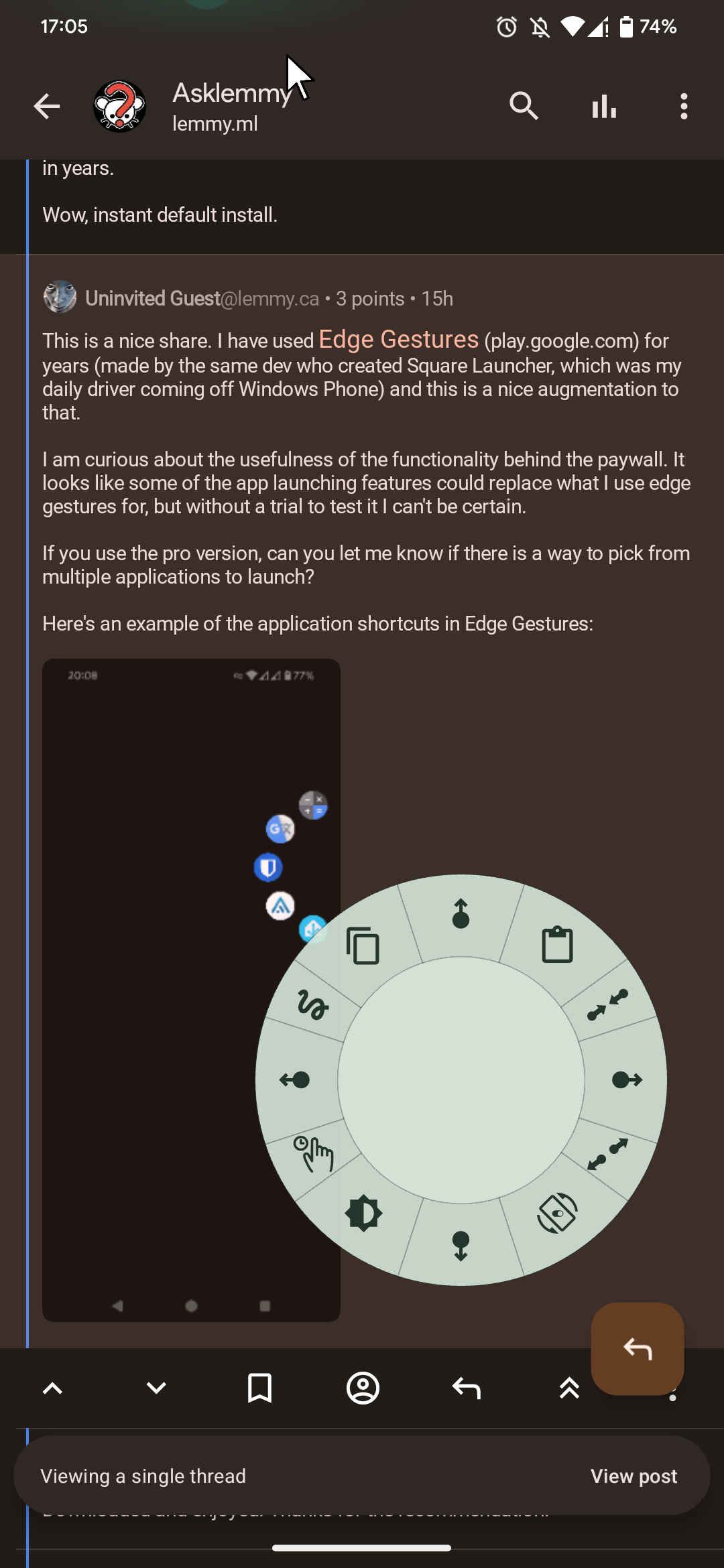
I set it so it activates when I tap and hold the tracker, it shows up those shortcuts. If I slide my finger towards one of the shortcuts, it activates it.These are my edge actions
These are actions/shortcuts that you trigger by pushing the cursor to the edge of the screen.You can pick any app from your phone or any of the actions available in the app, there are a lot… Like system controls (volume, brightness control, media playback buttons, screen lock, screen rotation, etc.) and you can also make a shortcut for Tasker/MacroDroid/Automate action. So basically, you can make a shortcut for almost anything you can think of.
Legend!
no F-droid?
That’s stupid, so good. How haven’t I heard of this before?
Linux, seriously, it’s in my phone, my router, my desktop, my ISP and nearly the entire infrastructure of the internet upon which I rely uses it.
deleted by creator
I will!! Right after I look up the key command that does that.
deleted by creator
deleted by creator
What if I swap it out with helix like that statue in Indiana jones
deleted by creator
I used to use neovim for a while, the main reason I migrated to helix was because it just has everything built in, no need to spend hours getting lsps working and everything
The motions are vastly better than vim though imo, the select as you go thing makes it feel a lot more natural
(For example, w moves you to the end of the word and selects it, then pressing it again deselects and selects the next word unless you’re in v mode)
Meaning to delete a word it’s w+d not d+w
Also very good multi cursor support, instead of typing out a long sed command I can select a block or all, and do S,(regex) and it spawns a cursor on every match which can do everything the normal one can
As for it being everywhere have you ever used sshfs? It’s always my go-to when editing projects on a remote server and then you can use whatever you want
Going back to a “normal” text editor after using Vim for a few years would be horrible
Life without qBittorrent would also be pretty difficult, hell no, I’m not paying for DRM content that requires proprietary software to watch
I really like qbittorrents built in search feature.
Yeah the search is pretty nice, but I prefer my selfhosted instance of bitmagnet
A compiler. I mean, yeah, I guess I could go back to writing asm, but I really don’t want to.
asm? ha! back in my day we were hammering ones and zeros into clay tablets.
Firefox, uBlock Origin, uBlacklist KDE, Dolphin, Kate, LibreOffice, CherryTree Kid3, Flacon, LosslesCut, qBittorrent, VLC Musicolet, Simplenote, F-Droid, AuroraStore
I agree with everything and also with Musicolet, like no other mp3 player felt right until this one, it has everything I like, I listen to downloaded audio books, and can effortlessly change audio speed and pitch, sleep timers, and folder directories.
I desperately want a Linux desktop version of this.
I’m bored so I’m just going to make a list:
-
Lightroom Classic (I’ve tried Darktable, just not for me. I take a lot of photos on my DSLR and I’ve been using Lightroom since 2015 so for me it’s worth eating the awful monthly subscription that I split with someone else.)
-
Anki (flashcard app, very popular among med school students and folks trying to learn new languages. Open source and tons of useful decks available. I’ve aced plenty of exams thanks to Anki.)
-
Bitwarden (finally caved and got a password manager-- could not be happier)
-
CHIRP (the best for programming handheld, mobile and base station radios)
-
CrystalDiskInfo (great for checking the health of SSDs and HDDs)
-
DaVinci Resolve (love using this for video editing-- pirated copy was easy to find)
-
Deluge (great for torrenting)
-
foobar2000 (I love it for music)
-
Greenshot (useful screencapture software)
-
inSSIDer (great for wifi analysis)
-
IrfanView (very good for photo management)
-
MusicBrainz Picard (amaaaaaaaaazing god tier music management software to get all the correct metadata/album art)
-
reWASD ($7 but it’s so good for no BS macro’ing of keyboard/mouse/gamepad shortcuts and profiles. I have two PCs and two mice + gamepad attached to my PC and this software is very helpful. I think the license is for life.)
-
WizTree (SSD/HDD visualization tool that is useful for figuring out what’s taking up too much space on your drive)
Three stages of a passwort manager
Stage 1: I do not need a passwort manager
Stage 2: Maybe I need a password manager
Stage: Why didnt I setup one way earlier???Why pirate Resolve? The non studio version is free (but not OSS)
Hardware decoding was my reason for upgrading
It’s a one time fee by a great company that gives you a robust free version. Just pay for the damn thing dude. Reward a company with generally good practices and great software that isn’t nickel and dimeing us with shitty subscriptions.
Hell their cloud project subscription is a steal too. Five dollars and I can have as many projects going as I want accessible anywhere/able to be collaborated on in real time with colleagues? Ridiculous.
Is there a particular draw for foobar2000? I remember a while back I was looking for a music player and that kept coming up, but I found it underwhelming when trying it. I’ve been using MusicBee for a long while now, and have found it excellent, so I don’t plan on switching, just curious if there’s something I’m missing.
Just familiarity for me.
-
firefox
Python
Python is underappreciated
7zip
git, vim/nvim