Which Linux command or utility is simple, powerful, and surprisingly unknown to many people or used less often?
This could be a command or a piece of software or an application.
For example I’m surprised to find that many people are unaware of Caddy, a very simple web server that can make setting up a reverse proxy incredibly easy.
Another example is fzf. Many people overlook this, a fast command-line fuzzy finder. It’s versatile for searching files, directories, or even shell history with minimal effort.
A few that I use every day:
- Fish shell
- Starship.rs
- Broot (a brilliant filesystem navigator)
- Helix editor (My favorite editor / IDE, truly the successor to vim IMO)
- Topgrade (updates everything)
Just commenting to give more love to helix. It’s my favorite “small quick edits” editor.
Helix is great thanks
Could you explain them in more depth? I opened them and don’t know
Fish is a replacement of bash that’s a bit more user friendly (has some cool auto completion features out of the box and more sane behaviour like handling of spaces when expanding variables). I personally started to use nutshell recently but unlike fish it’s very different from bash.
Starship is a “prompt” for various shells (that bit of text in terminal before you enter the command that shows current user and directory in bash). I haven’t used it but AFAIK it has many features like showing current time, integration with git, etc.
Yep, here’s my Starship prompt, for example:
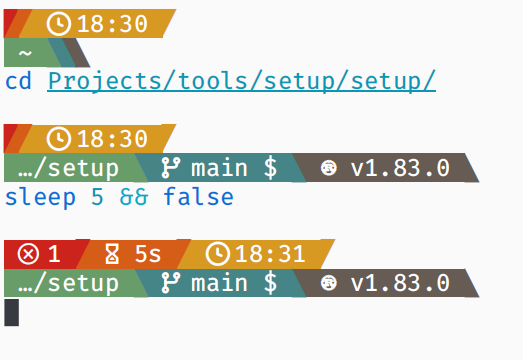
So, I have it configured to show:
- the exit code of the last command (if it’s non-zero),
- the duration of the last command (if it’s longer than 2 seconds),
- the time (when the last command ended),
- the current directory,
- the current Git branch, and it also shows some Git status information, for example the
means I have something stashed, - and finally the technology in use in a repository/directory, so in this case that repo uses Rust and the compiler version is 1.83.
Thanks for adding this. What does stashed mean
Oh, when you’re coding something in a Git repo and you realize that you need to make a different change before you continue coding (e.g. switch to a branch, pull newest changes, or just create a separate smaller commit for part of your change), then you can run
git stash pushto put away your current changes, then make your other change, and then rungit stash popto bring your ongoing changes back. I recommend readinggit stash --help, if you want to use it.Sometimes, though, you might end up just taking it into a different direction altogether or simply forget that you had something stashed. That’s when that indicator comes in handy. Because while you can have multiple things stashed, I do find it’s best not to keep them around for too long. If you do want to keep them for longer, then you can always create a branch and commit it as WIP onto there, so that you can push it onto a remote repo.
Thanks!
Once Helix gets plugin support and someone makes a Clojure REPL plugin as good as Conjure I am never touching
vimagain!It does have clojure lsp support, but you’ll probably have to use a command line for most repls.
Yeah the clojure lsp support is top notch, but there being no support for “jacking in” to a repl is the big thing keeping me from using helix full time. There’s a way of doing it if you use kitty, but it’s pretty janky.
Do you have experience with either ranger, lf, or yazi? I’m wondering how broot compares. Big fan of file ranger, and this looks very similar.
I’ve used ranger, but I’m not as big a fan of it as broot.
I use fuck to fix typos
That’s fantastic, I can’t wait to go home and install it
If you’d map it to just
fit’s even more handyYou gain efficiency, but lose fun
this just reminds me of
pleasewhich runs the previous command withsudoI use fuckit to fix exceptions
That sounds dangerous. I hope it never tries to fix anything with
rmYou have to confirm any command before it runs, so no more dangerous than baseline rm
The pipe (
|), which if you think about it is the basis for function composition.deleted by creator
I use it occasionally but every time I need to do something a tiny bit more complex than “extract field from an object” I have to spend half an hour studying its manual, at which point it’s faster to just write a Python script doing exactly what I need it to do.
https://github.com/johnkerl/miller is like awk, sed, cut, join, and sort for name-indexed data such as CSV, TSV, and tabular JSON
Funny how this was one of the first tools I learnt once I “seriously” started my linux journey, lol
awksimple
Came here to say both of these things. (Awk and “> simple”.)
To be totally honest, I don’t think awk is any more complicated than something like grep, it’s just that regular expressions get used more often so they’re typically more familiar. In the same way that programming languages with c-like syntax (like Java and C#) often feel easier than ones that don’t (like Haskell and Clojure).
Control+r == search through your bash history.
I used linux for ten years before finding out about that one.
Works much better with fzf, but even just default bash it’s useful.
i just cat grep .bash_history lol
but this does sound more convenient xD
So did I until reading this post. Thanks!
I find myself using tldr a lot since finding out about it. It’s just so useful for commands that I don’t use enough to commit to memory.
What is it?
You type tldr and then some command. For example, tldr tar. It gives you a small list of examples and common use cases for the command.
deleted by creator
It’s for people to memorize hundreds of arcane shortcuts and shit so they can feel like a smug hacker and gloat over the rest of us using other editors and getting just as much done as they are.
Also for graybeards that haven’t realized it’s not 1985 anymore.
deleted by creator
Wow, who hurt you? Vim is fun, and just because you can make things work without it doesn’t mean it has no practical benefit. It’s nice to have an editor as powerful as an IDE that doesn’t require a graphical environment.
Hundreds of shortcuts is emacs, by the way. A major perk of modal editing and the vi editing language is that you can compose relatively few operations to accomplish many tasks rather than memorizing lots of more complex and specific shortcuts.
Wow you triggered a lot of vim users !
Maybe give micro a shot :) It’s nano but more sane defaults and comes with customization in mind.
vim isn’t required for any files, you just followed online tutorials for how to edit those files instead of RTFM
terminal text editing is convoluted because it has to strike a balance between figuring out when a keypress is part of the text you’re typing, vs when it’s a command you’re using, and making sure that all the editor commands the designer wanted are accessible.
vim is great because it allows for thousands more editing commands and macros, and much more customization of the editor, up to allowing plugins that emulate other functionality. As it stands, my setup basically functions as a full, lightweight-ish, multi-language IDE that rivals Emacs or Visual Studio.
On top of all that, I don’t have to move my hands away from the homerow of keys to navigate or edit, which may not seem like much, but adds up to a lot of avoid typos and time saved from moving my hands to reach the arrows/delete/home/end/pgup/pgdn.
Some examples:
h,j,k,lmove left, down, up, and right respectively, but they can be combined with a number to move that many rows or columns; e.g.6jwill move down 6 rowsdddeletes a line, but using a number +d+ a movement will delete that many characters/lines in the path of the cursor: e.g.34dlwill delete 34 characters to the right of the cursor,12dkwill delete 12 lines up.ggwill take you to the first line,Gwill take you to the last, and number + either will take you to that line: e.g.3275ggor3275Gwill take you to line 3275and finally you can use
/text or regex pattern you want to search forand Enter to search the document for the first occurence below your current location, and then usento search for the next occurence, orNto search for the previousThat doesn’t even scratch the surface (that’s just the cheatsheet, which only scratches the surface), but if you can get a handle on only what I’ve said, and switching between input and command mode (
iandEscrespectively), the speedup to navigation alone will make it seem more sensible.And as always, don’t forget to
:wq(write to file and quit)seems like you need to try micro. It’s like nano, but with more sensible standard keybinds imho, as well as syntax highlighting and global clipboard use.
Nano is hella confusing too. Since when is
^= Ctrl?And why dont they tell you that Ctrl+S Ctrl+C Ctrl+X works?
^C has been notation for ctrl-c for decades.
I grew up with the ^ symbol meaning CTRL. Kids these days.
As for why: arbitrary choice, they just needed a printable character they could show on screen, for when people pressed it and the terminal echoed it back out to them.
Yes but I am not that old and never saw it anywhere. So while it makes as much sense as hjkl it is not beginner friendly.
deleted by creator
igtfo\ :q!
I know
tmuxis incredibly popular, but a good use case for it that isn’t common is teaching people how to do things in the terminal. You can both be attached to the same tmux session, and both type into the same shell.tmux is my religion
zoxide. It’s a fabulous
cdreplacement. It builds a database as you navigate your filesystem. Once you’ve navigated to a directory, instead of having to typecd /super/long/directory/path, you can typezoxide pathand it’ll take you right to/super/long/directory/path.I have it aliased to
zd. I love it and install it on every systemYou can do things like using a partial directory name and it’ll jump you to the closest match in the database. So
zoxide pawould take you to/super/long/directory/path.And you can do partial paths. Say you’ve got two directories named
datain your filesystem.One at
/super/long/directory/path1/dataAnd the other at
/super/long/directory/path2/dataYou can do
zoxide path2 dataand you’ll go to/super/long/directory/path2/dataBetter than fasd?
I don’t see anyone mentions
htop. So, I will:) Just works, could be installed in any distro. Much more friendly than top but isn’t bloated with features as some other alternatives are.My fav for the past few years is https://github.com/ClementTsang/bottom
CTRL-L to clear your terminal output. Or type clear
Also
Ctrl+Dto exit any shell andCtrl+Rfor reverse searching your history!
bcIt’s a simple command line calculator! I use it all the time.
Very useful for shell scripts that need to do maths as well. I use it to make percentages when stdout has values between 0.0 and 1.0
I once wrote a bc script that calculated parameters for the Blackman window for a FIR filter. (Had formulas already so not that impressive) Upped the precision until it needed like 30 sec to calculate, completely unnecessarely :).
yq is crazy cool for converting between different text-based data formats such as yaml, json, xml, csv and others, and it has a super nice pretty-printing function as well. I use it all the time!
Just be aware that your distroy might come with a yq variant too, but possibly one that isn’t as powerful as the one I linked. I know this to be true at least for Ubuntu.
See also https://github.com/TomWright/dasel
Can it handle a file that has corrupt json? Or does it just tell you “no”
vd(VisiData) is a wonderful TUI spreadsheet program. It can read lots of formats, like csv, sqlite, and even nested formats like json. It supports Python expressions and replayable commands.I find it most useful for large CSV files from various sources. Logs and reports from a lot of the tools I use can easily be tens of thousands of rows, and it can take many minutes just to open them in GUI apps like Excel or LibreOffice.
I frequently need to re-export fresh data, so I find myself needing to re-process and re-arrange it every time, which visidata makes easy (well, easier) with its replayable command files. So e.g. I can write a script to open a raw csv, add a formula column, resize all columns to fit their content, set the column types as appropriate, and sort it the way I need it. So I can do direct from exporting the data to reading it with no preprocessing in between.