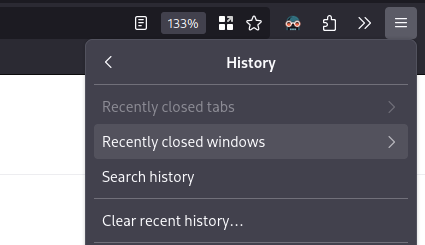

I generally have a “home” Firefox window with my most used tabs pinned. Sometimes I close it before another window, so I was frustrated to “lose” it and having to redo my pins. But recently I discovered this feature. Joy!
How would people function without knowing this?? Maybe I’m just young, but this has been a thing as far back as I can remember (maybe 2010 or so), on all browsers I’ve used (Safari, Chrome, Firefox).
It got removed from chrome a while ago. Have to use an extension for it.That’s terrible. I’m so sorry.
Command + Shift + T on mac os, and Ctrl + Shift + T for Windows
You’re welcome
Don’t forget Ctrl + Shift + N
Or Ctrl+Shift+P for Firefox
I save that one for secret fun time
That’s last closed tab, not window.
Edit: actually it will reopen a window too if the last closed tab was on it.
I think that’s a fairly recent change, I remember reading it in the changelogs. There was also something else relating to the feature, but now I don’t remember
deleted by creator
CTRL+SHFT+
tWill reopen your last closed tab.
CTRL + SHIFT +
nFor a recently closed window.
Literally every browser has this feature, it’s not unique to Firefox.
Firefox didn’t have it for the longest time so a lot of people don’t know
So we’re giving them props for something that’s been available on chrome for a decade?
No, we are letting people know it’s there
Shift+ctrl+T is usually the keyboard shortcut to bring back closed tabs Shift+ctrl+N is to bring back closed windows (doesn’t work on private browsing windows)
I’ve found that it does work in private sessions
I can still feel the pain when it’s 2 AM and you meant to Ctrl + Shift + T and you’re muscle memory leaks in and hits you with the Ctrl + Shift + W.
FYI there’s a confirm close option that will mitigate this terrible scenario, for anyone that’s been there before.
ctrl+shift+t
I rely on this all too often…
You can just press CTRL+SHIFT+T and CTRL+SHIFT+N continually to reopen closed tabs and windows, respectively, in the order they were closed.
Chrome crippling the reopen tab option(they removed from right click menu) is what drove me back to Firefox.
Not here to defend chrome, but Ctrl+Shift+T works on chrome as well still.
I don’t use keyboard shortcuts. And the right click menu only has like 5 things, and that was the option I used the most. It was a pointless change.
Waht… I haven’t used chrome in years. Unbelievable they’d remove that.
It also persists through a reboot, so if you shutdown or reboot with tabs open, it will ask you to restore the previous session when you next start it after the boot.
If you didn’t restore it, but didn’t open any more tabs, you can close it again, reboot, etc, and this option will still work to get your tabs back when you’re ready.
It works until Firefox applies updates and the next time you open it it automatically loads a “what’s new in Firefox” tab erasing your previous session. Then you’re SOL unless there’s some way around that.
After updates, mine always opens all of my tabs. Maybe check your settings.
I’ve not started a fresh session of Firefox in years tbh. Not sure why it is different for you.
For reference, holds true on my phone, desktop, sim desktop, programming laptop, hobby laptop, network testing laptop, media laptop, backup management laptop, steam deck, second steam deck, virtual red hat machine, virtual windows machine, and hackintosh. So, a wide variety of environments. Never experienced this issue.
Same here (tabs always restored). I’ll do an update with Firefox open; eventually it’ll make me restart it, but always, tabs are there.
You’re being downvoted or something but it’s same for me.
I love Firefox but every time I update it there’s this page with “Yay now you’re safe because you updated” that randomly can open as a new tab in my existing session or as a new window with a single tab and erase my previous session. And I hate it. Like, this page doesn’t give me any useful information, I never asked for it, I can’t turn it off, and that’s not all of the problem, even more, this stupid page loses my information and undoes my work of opening and arranging my tabs the way I like.
deleted by creator
It might be true but still I don’t understand why it has to work like that and it’s not intuitive at all.
deleted by creator
I highly recommend Tab Session Manager if you’re a crazy person like me.
itsa great extension for people with internet problems
thanks, didn’t know this one but seems highly helpful
Saved my ass many times.
Only the last three or so windows though, so if you got a few pop-ups before you press that you might be screwed…
…unless you have backups of an old session file, then you can use this tool to restore a list of those tabs: https://www.jeffersonscher.com/ffu/scrounger.html
There is also this handy addon for saving backups of windows like that to a txt list of urls: https://addons.mozilla.org/en-GB/firefox/addon/urls-list/