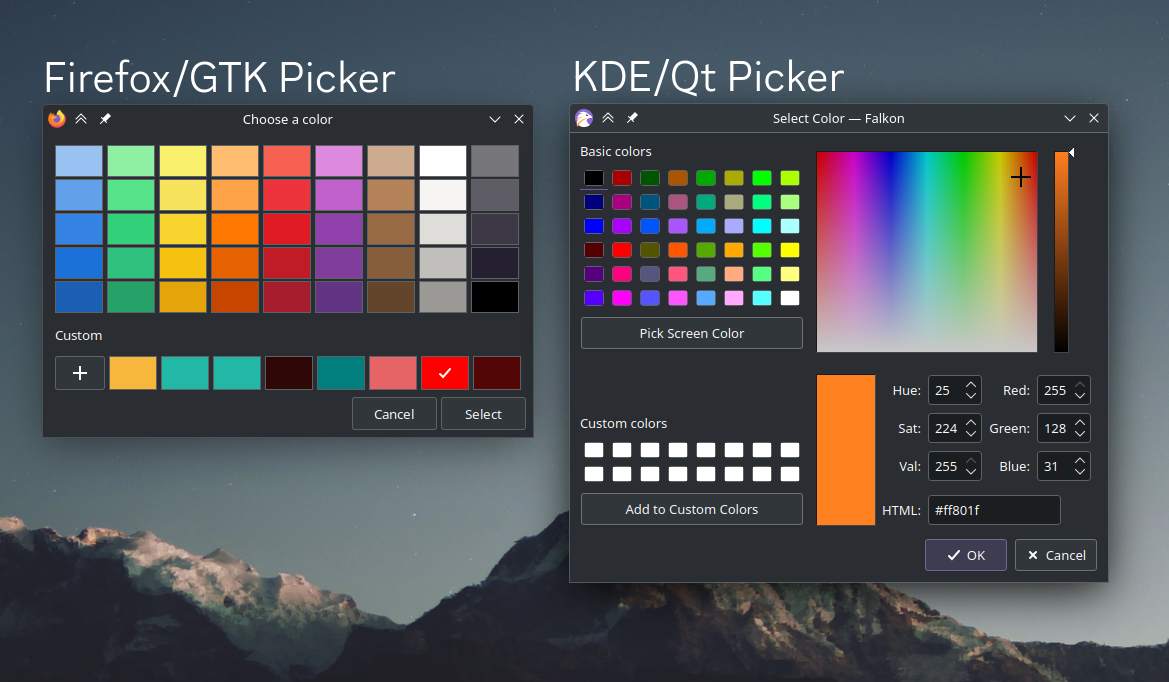

I use KDE Plasma, and much prefer the KDE color picker over the GTK one that Firefox uses, with input type=color.
I know that I can set GTK_USE_PORTAL=1 to make Firefox use the native file picker, is there a way to make it use the native color picker as well?
I know there probably isn’t a way, but I figured it’s worth a shot asking.
Entire Comment Section discussing the weird comment of @over_clox instead of OPs Question lmao.
😢
I solved the issue of Firefox not following my theme on KDE by abandoning Firefox and using Waterfox.
Functionally identical in every way except Waterfox follows qt instead of gtk.
It’s a stretch, I’ve never used waterfox’s color picker. But it may also use qt instead of gtk.
Just tried it. Same colour picker as Firefox unfortunately.
I’m even more intrigued by their idea for a “good” color picker. From the way they describe it it just sounds like a UX nightmare
Ah, that’s where the discussion is! Lovely!
*ignores OP question and scrolls down to join in*
I did try to find something last night but couldn’t find anything unfortunately :(
I didn’t even know there was a color picker in Firefox !? What it is used for?
The color type form input. It’s a HTML standard, all modern browsers have it.
Oh ok that makes sense I guess I don’t usually use anything like that… Plus I was thinking of the browser itself using it for something…
In about:config see if setting widget.use-xdg-desktop-portal to true does anything for you.
Hmm, it appears it already is set to true. Unfortunately that doesn’t seem to work.
If I recall correctly that enables the kde file picker at least
Yo kde color picker exists? How do I use this?
It pops up whenever a KDE application offers colour selection. Easiest way is probably to open settings to
Appearance > Colorsand click theCustombutton.Falkon also uses it with
input type=colorwhich is why the screenshot says Falkon in it.