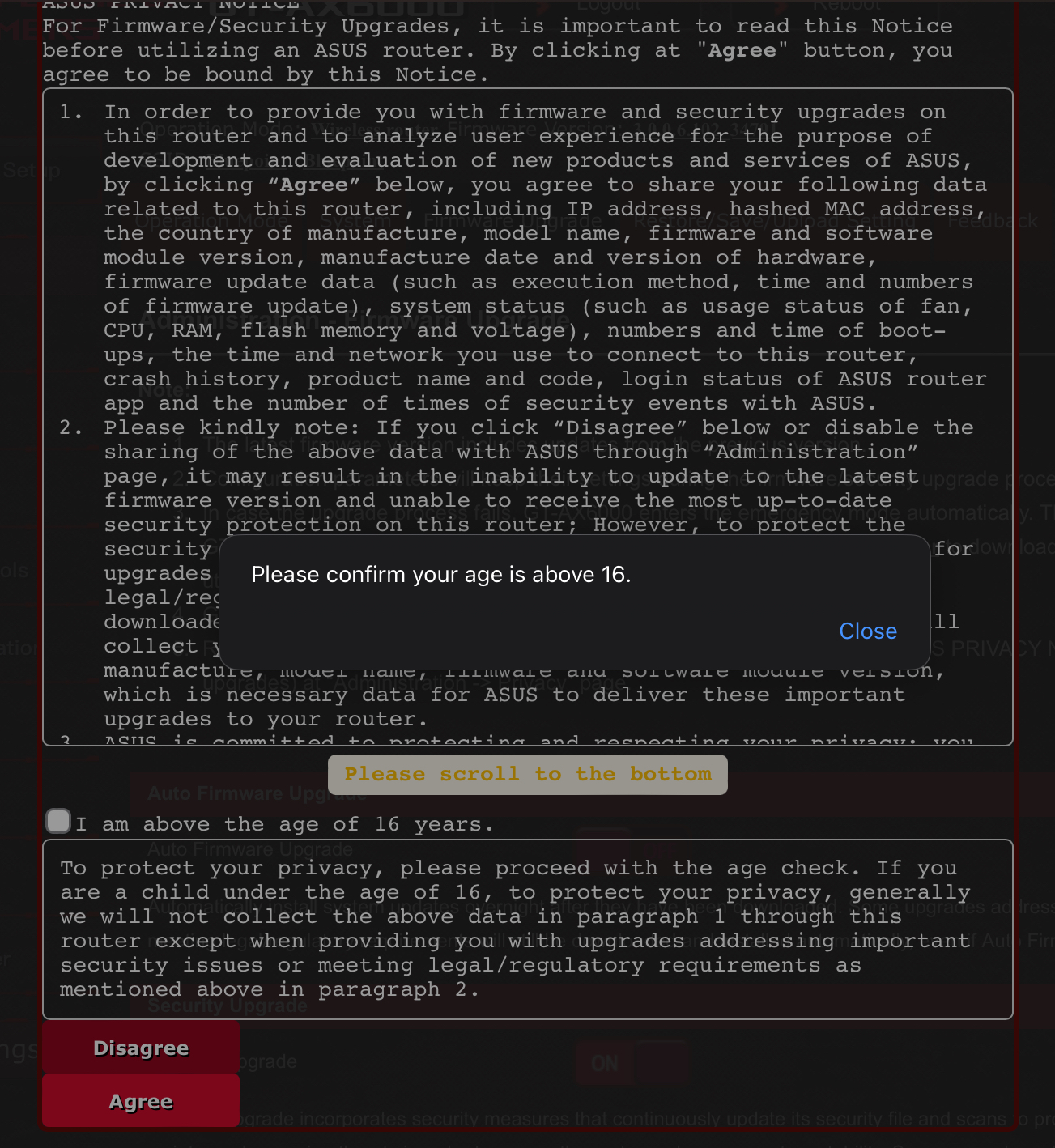
ASUS rolled out an update to its firmware (3.0.0.6.102_34791) that now requires users to be over the age of 16 and to send a slew of metrics and data back to ASUS. If you do not agree or do not check the box to verify you are 16y or older, you cannot use the router. At this time, I’m not sure if ASUS has meant to disable the router for anyone under 16 or if it’s a bug.
You can opt out at any time but lose access to a slew of features:
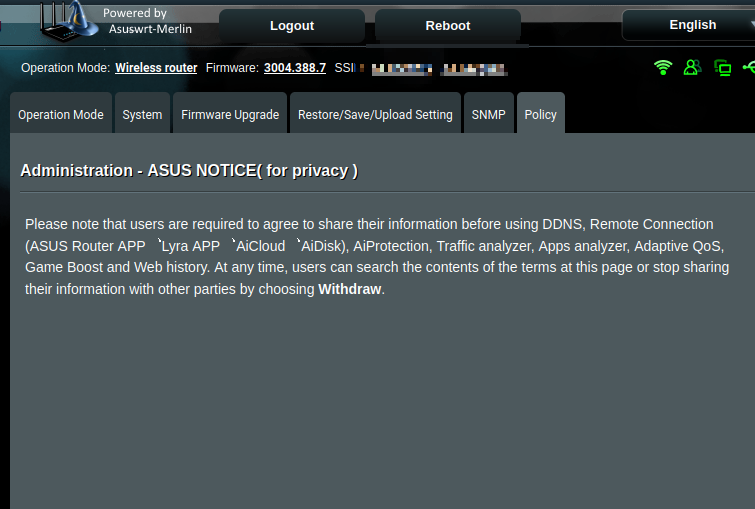
Please note that users are required to agree to share their information before using DDNS, Remote Connection (ASUS Router APP, Lyra APP. AiCloud, AiDisk), AiProtection, Traffic analyzer, Apps analyzer, Adaptive QoS, Game Boost and Web history. At any time, users can search the contents of the terms at this page or stop sharing their information with other parties by choosing Withdraw.
Moreover, ASUS disables automatic firmware updates and worse, all security upgrades unless you opt into the data sharing. Security upgrades perform the following:
Security upgrade incorporates security measures that continuously update its security file and scans to protect against malware, malicious scripts, and emerging threats in order to secure the router and ensure system stability. Some upgrades addressing important security issues or meeting legal/regulatory requirements will still be downloaded and installed automatically, even if “Security Upgrade” is turned off.
Edit: I have personally contacted their CEO’s office, but if others would like to voice their disapproval as well, here is a link: https://www.asus.com/us/support/article/787/
The title could use the word “router” somewhere.
Fr. Had me thinking ASUS Motherboards. Really had me going there😅
They are next 🫠
New ASUS firmware now requires a user to be 16y or older router and will restrict features and even security upgrades if you opt out
Like that?
New ASUS firmware now requires a user to be 16y or older router and will restrict features and even security upgrades if you router out
Missed a spot.
Wow thanks I never could have figured that one out myself!
Kind of. If the word “router” would be placed after the 2nd word, it would even make sense!
Done 🙏
The last thing I want is my router sharing information with other parties.
I worry about that more than I should. But yeah, that is the central hub that everything goes thru. I actually don’t even want it to ping Asus’s update servers because I can’t be sure what kind of data is being sent.
I moved to Merlin firmware and hoping that doesn’t have any telemetry. Unfortunately OpenWRT doesn’t support wifi 6/6E routers and even the rare ones it does support, aren’t really the greatest.
I want the asus hardware, just not their shitty software.
The list of supported WiFi 6-capable routers has a good number of entries.
Because they aren’t legally allowed to spy on minors they add this shit to bypass it?
Precisely
Nasty. Thanks for the heads up.
NP. I was pretty pissed as they haven’t released a new update in almost a year and when they did, this is all that’s been changed.
Good news is moving to WRT Merlin is a piece of cake and even carries over all your original settings. Hopefully they rip out this crap with their own firmware.
I wanted to swap over to Merlin last year but my router isn’t supported. Grrrr!
Asus went the bad way. Check out louis rossman vídeos about asus, héroes one of them. https://www.youtube.com/watch?v=NHQqKi9NcTs It is a company to be avoided. It went the non ethical way.
Every other company seems to charge for parental controls. It’s so stupid, I don’t need another fee just because I have a child in my life.
I wanted to degoogle, so I looked for a new router and ended up with an Asus.
It’s fine for router hardware if you replace the firmware with OpenWRT (only when that is possible and feasible, of course).
Or do you think there are better manufacturers?
If you own a router from ASUS and find OpenWRT too difficult:
install Asuswrt-Merlin
The data sharing happens on merlin too
It builds on devices’ source code published by ASUS. The is no data sharing with ASUS.
Merlin’s privacy disclosure:
The only outbound connection made with me by this firmware is when the firmware checks for availability of a new version.
That thread is about the official firmware as distributed by ASUS.
Here are some screenshots from my router administration pages. Notice the “Powered by Asuswrt-Merlin”.
In the first image you can see that I have a particular feature disabled.
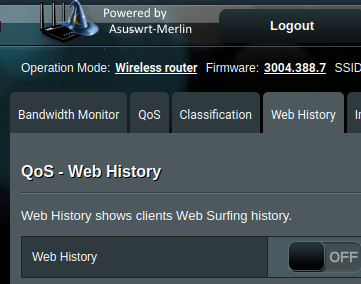
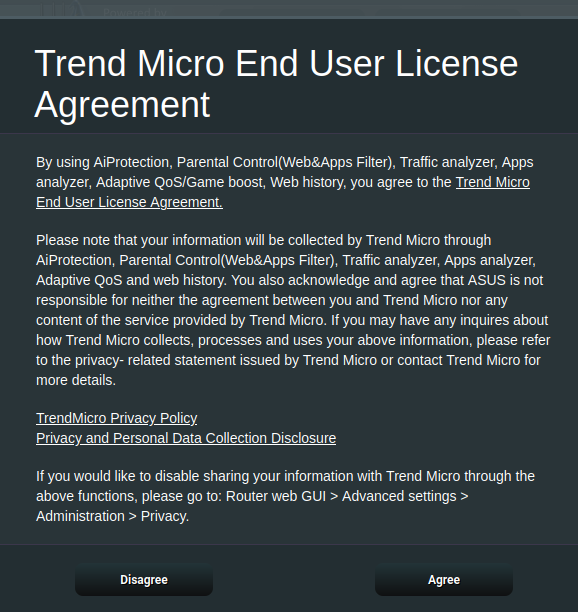
When I toggle it on I receive a warning that my information will be collected by Trend Micro.
I included another screenshot showing the location where I would withdraw my consent to having my data collected, were I to actually use the advanced features of the router, that I thought I was paying for at the point of sale. Instead I was apparently paying for the privilege of having the option dangled in front of me, behind an agreement for yet another, separate company to collect my family’s data.
This is sickening.
People should use alternative routers and software such as OpenWRT, DDWRT, and Gl.iNet routers
Yeah. When I bought my ASUS router I was looking into OpenWRT supported routers but they are really hard to come by (at least in NA) and quite dated. Router manufacturers really don’t want to have their telemetry removed.
One of those tiny low power PCs with OpenSense is a good alternative, but a bit more work. The only downside is that you need a separate switch and wifi access point.
OpenWRT is better for a lot of reasons. It isn’t as user friendly but if you know a little networking you will be fine. The big thing is that automatic updates aren’t a thing so make sure you manually update.
OpenWRT is pretty user friendly, in my experience.
It isn’t half bad but it does use a lot of terminology and can be overwhelming because it has so many options
It isn’t half bad but it does use a lot of terminology
That’s why it’s user friendly. Try configuring one of those “user friendly” consumer grade crap routers. Due to the use non-standard descriptions in a misguided effort to be user friendly no one actually has any clue what settings actually do.
Good point but most people don’t have a good networking background. That’s why some companies ship openWRT with custom skins
But with those ‘user friendly’ UI’s no one knows what they’re doing. The user doesn’t know regardless and now the expert they ask for help has no clue either.
I disagree. It automatically sets up location and a password which is a big step. You keep clicking next until you are done
That works great until it doesn’t, and then you’re fucked.
Okay ASUS is out. Recommendations?
PC with opnsense.
And up goes the energy bill
Something with OpenWRT. Turris Omnia is pretty good.
Man, idk. I installed WRT Merlin in hopes this doesn’t make it there. OpenWRT is really hard to get onto routers. Even the ones that support it (which tend to be pretty dated) have a ton of hurdles or restrictions as manufacturers really don’t want to lose the telemetry.
Asus makes great hardware unfortunately. Some of the fastest and most performant routers out there. Moreover, they don’t rely on subscriptions to gate some of the features like pretty much every one else.
I tried TP Link and Netgear (if their “legendary” Nighthawk) and the Asus just blew them away on every level. Especially stability and reliability.
OpenWRT is really hard to get onto routers
I bought the Nanopi R4S, and it was extremely easy to switch out their modified OpenWRT for vanilla (literally just use a command/program to install the image on an SDcard). Granted, I did have to find a solution for wifi, but even that was easy with the Belkin RT3200s and the instructions (more in-depth, but still hand-holding). I also flashed it onto a Netgear AC1200 using nmrpflash, which sounds imposing, but really just entailed installing the pre-reqs, hooking the router’s ethernet port directly to my PC’s and running the command.
I did have to do my research to arrive at my decision to buy these specific models for their compatibility with OpenWRT. If you don’t, you might end up with something that requires popping open the shell and setting up serial comms, which is a pain.
As far as I could find, out of the three Wifi6 enabled Asus models (RT-AX###) that are compatible with OpenWRT, 2 require ssh and running commands that are given in the guide; the other one, and all of the supported AC### models, seemed to work using ASUS’s built-in web-app to upload the OWRT image. I wouldn’t say any of it is easy, but I also can’t agree with “really hard.”
Another consideration is setup and maintenance. Proprietary firmware tends toward being as “click here to set and forget everything, here are the only 3 pieces of info you need to know from now on”; OpenWRT is definitely more hands on and requires a lot of RTFMing and routine maintenance.
deleted by creator
FYI the open source OpenWRT based Banana Pi R3 AX 4x4 is a thing. Don’t buy closed source Routers/APs on purpose.
You can just buy a off the shelf router and flash OpenWRT many devices are supported. If you want to be sure just look it up before you buy.
deleted by creator
Probably. But still so shady to give the choice when it doesn’t actually work. Feels worse this way TBH.
Next DEFCON is in two months, can’t wait to see them get absolutely pwned.
I remember seeing that Openwrt is working on getting their own hardware sometime in the future. Might be worth looking at when the time comes. I’ll stick with merlin until that goes the same way.
Isn’t the Banana Pi R64/R3/R4 close enough to that?
I like Linksys for OpenWRT. They are cheaper and the chipset is often the same. They aren’t high performance devices by any stretch but they are pretty solid in my experience.
I do wish OpenWRT would partner with a existing company instead of trying to go alone. There are several companies that make hardware specifically for OpenWRT. It would be nice if they would just work to have a “certified by OpenWRT” badge. They could then donate a percentage of the sale to the project.
THE YEAR OF OPENWRT!
/s not /s