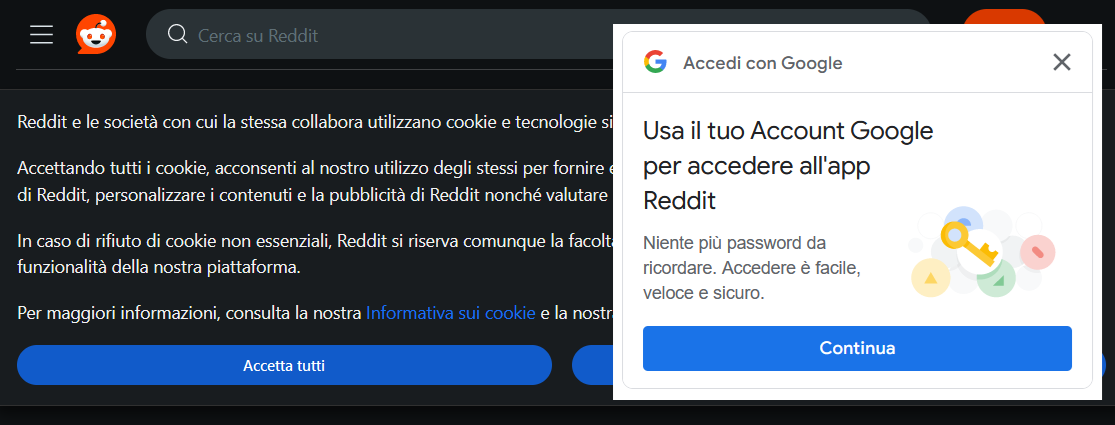
In the browser, i didn’t login in the google account, and I didn’t accept the cookies on that site. Using privacybadger that supposedly should block the 3rd party spyware like that
- Install UBlock Origin
- Click the extension’s icon
- Click the gears icon for settings
- Open the “My filters” tab
- Add a line with
||accounts.google.com/gsi/iframe/select?*
Steps 2 and 3 can be replaced by going to
about:addons, finding UBlock Origin, clicking thebutton and selecting “Preferences”.As an additional note this rule is already included in either
EasyList – Other AnnoyancesorAdGuard – Popup Overlays. I recommend just enabling either full category for a more usable internet.
I can’t seem to block them by just enabling annoyances blocks on my end.
“EasyList – Other Annoyances” has this:
! Google signin popup
###credential_picker_container
###credential_picker_iframe
“AdGuard – Popup Overlays” has this:
! Warning: check, if auth using Google is not broken
||accounts.google.com/gsi/client^$third-party,script,domain=
My impression is that the rules want to avoid breaking Google sign-in completely, which this rule may do.
It must be the former because I have the latter enabled and still see them
Set your language to English: you’ll get the nag in English.
🥁🪘🥁
Sorry…
Seriously though, install Ublock Origin and block as many Google domains as possible. In Reddit, to get rid of that particular nag, block
accounts.google.comandgoogle.com.Alternatively, don’t do Reddit.
Alternatively, don’t do Reddit.
“Cpt. Obvious move” detected. I like it.
Old reddit redirect or popup off could probably work as well (both are exentions on firefox).
Click the eye dropper symbol in uBlock, that opens the element picker.
Next, click the popup, and then preview > apply
deleted by creator
As other people have mentioned, you can use uBlock Origin to hide these banners.
For Reddit specifically, I recommend using a private frontend called Redlib. You can install LibRedirect to automatically redirect all Reddit links to Redlib.
Ah dude no1 has pointed u to the holy grail. Here u go my fellow human https://www.reddit.com/r/uBlockOrigin/wiki/solutions/#wiki_google_login_dialogs_on_various_pages
P.s. there is only ublock. Ublock is king/queen
Thanks, commenting to find this later.
There is a save comments function on Lemmy 😉
There isn’t on kbin.run
noscript stops these dead.
also stops most other nefarious things sites want to do in your browser.
also stops many good things, so your day to day surfing will encounter more friction, but be safer.
Technically yes, but the Google and Googlegetmanager scripts are used in so many cases that you want to keep them active permanently.
those are two of my favourites to block, but that’s just me
Non usare chrome nel caso fosse il tuo browser e installa ublock su firefox
For optics only:
Use uBlock Origin, choose the object picker and remove the banner.For real blocking: Use uBlock Origin and block the Google domains as suggested in another answer.
I got annoyed by something similar (E: also a google sign in pop up, in the same spot, though looks a little different than yours) not too long ago and found this worked:
https://support.google.com/accounts/thread/219332922?hl=en&msgid=222171998
I tried that multiple times. GOogle ignores my setting.
This is how the relationship is with them. I moved on 10 years ago, they fought my every step, e.g. suddenly exporting from Drive didn’t work.
Like all toxic relationships, you’re better off without them.
That sucks. I had an issue at first with it only giving the option for android even though I’m on pc, but eventually I managed to get it right, I think there was another sub menu or something, I can’t remember exactly since it was a few months ago now… If that’s not it, I guess give some of the other options given here a try?
Install ublock, add a filter to block the login prompt in the “my rules” section
Can’t find the exact rules I have but when I’m on my desktop i can reply with them, there’s a bunch of variants I found searching for it but they should all work (unless googles changed stuff)
I use this rule:
accounts.google.com/gsi/*Is yours similar?Yep!
||id.google.com^ ||accounts.google.com/gsi/$3p ||smartlock.google.com^ ||accounts.google.com/gsi/iframeFeels pretty overkill at this point, can’t help assume most of its redundant but I haven’t run into any issues yet. I got them from this firefox support thread a while back
deleted by creator
I don’t know either, but keen to see what people suggest!
deleted by creator
Firefox on its own blocks some of these popups (in some countries). Otherwise, add some annoyance filters in ublock origin
I use Fennec for Firefox. Fdroid can then do updates. I disabled Play Store and Services. plugins work on Fennec.
For reddit, try old.reddit.com with Vivaldi. It is chromium based so works on sites with chrome/blink bias, but also has built-in adblocker (needs to be turned on in prefs). For me, old reddit font scaling is better on Vivaldi than Fennec.