At this point it not about passive collection, corporations are going to extreme ends to get our data.
https://www.zeropartydata.es/p/localhost-tracking-explained-it-could
I am interested in what people are doing to enforce their privacy while using the web.
I have some things in place, looking to compare with the community.
(btw, I am new here, this is my first post. So uh… Hi )
I only use LibreWolf on my pc’s and IronFox or Vanadium on my phone. All except Vanadium have uBlock Origin with all social media blocked. I also use Mullvad vpn with social media blocking at dns level. In addition where vpn is not configured I use Mullvad’s dns with all content blocking enabled. Of course no Meta or another social media apps on my Graphene OS phone (except Mastodon and Lemmy). As a cherry on top I use a Linux based OS (OpenSuse Tumbleweed) on my computers primarily (some Windows usage for some gaming).
nice. Im looking to make the transition to graphene OS. would go to linux daily driver if I can get away from MS Office. I do too much writing collaboration with others and it gets wonky going back and forth with office users. Though Denmark is saying they are ditching office so that might incentivize alternatives and such. exciting times.
Im currently working on a whole stack, so docker pi-hole with unbound using dns over tls, squid proxy with maximum privacy, FF fork with ublock, privacy badger, noscript. mullvad and/or tor depending on where and when im using it.
If you use Office 365 web version of Word and Excel, you can use that in a Linux browser; no Windows needed.
good point. not a huge fan, but better than no option at all. Actually thats probably the best option for now.
So uh… Hi
Hi! Welcome
Sadly it’s not illegal (yet) but I hope they wake up and do something ¯_(ツ)_/¯
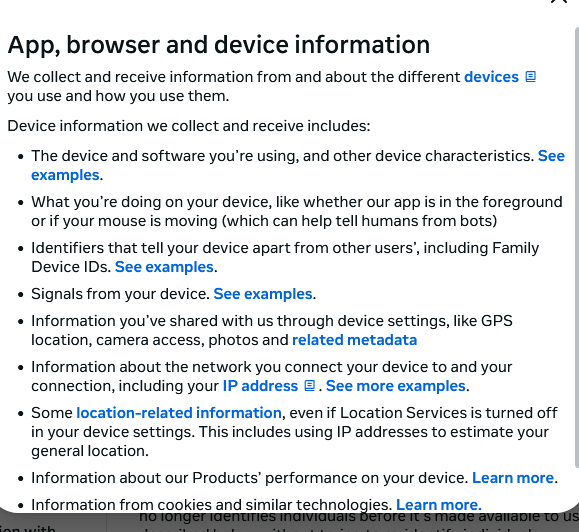
I visited Facebook to see their policy yesterday and that’s what I saw. Glad that I deleted my Facebook many years ago.

For Android:
- Use ADB (or similar tools) to remove Facebook, Meta, Twatter, Instagram, etc., from all your Android devices.
- Use a tool like RethinkDNS or other firewall to block block block. If using RethinkDNS, apply good blockers too.
- If using a firewall that uses your VPN slot, setup wireguard to use your VPN host
- Have different browsers on your device e.g. Brave, IronFox, Cromite. Follow online guides to set up.
- Use DuckDuckGo, SearXNG or Mullvadleta to search
- Never access Facebook, Insta, Twitter etc. from your mobile device. In fact, if you have the right firewall / blocking set up, you simply cannot.
- Do as much online shopping from a laptop / PC with a secure browser. Also, have about 3 different browsers there too.
- If you MUST use Facebook etc., only do it from a browser on your laptop / PC.
Just my personal strategy. My firewall logs show its quite effective but not fully impervious.
Checking out RethinkDNS right now, this looks great! Thanks. Was tracking most of the other stuff, that stuff holds true on computers as well, but on mobile I was kinda drawing a blank.
enforce their privacy while using the web.
Welcome, so I can recommend
- actually using the Web, not apps, namely Meta control the content sure but not the browser and browser vendors are trying their best to make the experience safe
- not using a browser made by a vendor that is in fact an ad company
- using a browser with privacy measures, e.g Enhanced Tracking Protection
- use 3rd party extensions, e.g. uBlock Origin, AdBlock Plus, DeArrow, Ghostery, JS Shelter
- use containers or private mode when browsing doubtful content
A bit generic perhaps, but… Before I dumped the Zuck, + Reddit, twatter and other Western for profit propaganda outlets, I left him a gift of 12 years of posts exclusively about anti-elite, anti-Zuck, anti-capitalist and anti-west topics. I kind of hope they use it now they are data-hungry and may not be censoring effectively anymore.
Saltman/OAI, Google and others 'free AI’s they use to train their models on, are used exclusively for research about western psychopathy, the ‘Blue Church’ Market ideology, and how AGI in the hands of private ***chopath techlords and a fanatical blue Church is an absolute recipe for disaster.
So, I hide what I can, buy from need instead of Ads (I consequently boy-cut all corporations/products that go through), use FLOSS p2p tools, std blockers/filters, and only use corporate/church services now when either absolutely necessary, or to let them train on/learn what I want them to learn. Let them re-analyze important critical papers, websites, collections, etc. Not ideal or easy, but better than nothing.
I am currently planning AI agentic tools to protect me/others from the corporate/blue-church’s sphere of propaganda/manipulation. It will constantly research and fight back on my behalf. It will be an adaptive smart filter between me and the nasty market ***chopathy.
Interesting in learning more about that. I do a lot of dev work with AI, agentic and otherwise. Did a proof of concept for quick fact finding but of course you run into “where do you source the truth” and the more I looked the harder it was.
is the Facebook app still able to receive the fbp cookie if it is in another profile or user? what if it lacks background network access?
is the Facebook app still able to receive the fbp cookie if it is in another profile or user?
It can cross those boundaries, but probably cannot delay messages to send later. Probably.
So it received the messages any time that both the browser and Facebook app are active at the same time, regardless of usual barriers that would block this.
what if it lacks background network access?
That should stop it cold.
Is the FB messenger app also effected?
I think if you are using any meta app on your phone yes. I would assume yes, if they put in the time to figure out the security bypasses then I cant see why they would limit it to one app. I removed all meta apps from my phone.
using? having! better uninstall them all, confine them into firefox if you still need them.
don’t forget to get rid of the 3 iconless meta apps either that are installed to lots of phones from the factory:
- Meta App Installer
- Meta App Manager
- Meta Services
you can only see these in the settings, installed apps list, after finding the hidden option to also show system apps.
App Manager or similar tools will also show them.