Beehaw
  • Communities
  • Create Post
  • search
    Search
  • Login
  • Sign Up
cm0002 ( cm0002@piefed.world )  to Programmer Humor@programming.devEnglish · 1 year ago

I_fucking_hate_them_now

media.piefed.world

message-square
54
link
fedilink
579

I_fucking_hate_them_now

media.piefed.world

cm0002 ( cm0002@piefed.world )  to Programmer Humor@programming.devEnglish · 1 year ago
message-square
54
link
fedilink
alert-triangle
You must log in or # to comment.
  • Iced Raktajino ( IcedRaktajino@startrek.website ) 
    link
    fedilink
    arrow-up
    70
    ·
    1 year ago

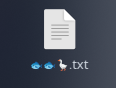
    I’ve recently learned that in Linux, you can use emois in filenames. I died a little lot inside when I learned that.

    • FrostyPolicy ( FrostyPolicy@suppo.fi ) 
      link
      fedilink
      arrow-up
      56
      ·
      1 year ago

      On Linux file systems you can use any character except NULL, and / is a reserved character.

      E.g. on ext-4 “All characters and character sequences permitted, except for NULL (‘\0’), ‘/’, and the special file names “.” and “…” which are reserved for indicating (respectively) current and parent directories.”

      • xthexder ( xthexder@l.sw0.com ) 
        link
        fedilink
        arrow-up
        44
        ·
        1 year ago

        I once accidentally created a file with a newline character in it… it was pretty tricky to fix from command line.

        • ma1w4re ( malware@lemmy.zip ) 
          link
          fedilink
          arrow-up
          56
          ·
          1 year ago

          • exu ( exu@feditown.com ) 
            link
            fedilink
            English
            arrow-up
            12
            ·
            1 year ago

            This is why you shouldn’t parsels output btw. Use find and read instead

        • GenderNeutralBro ( GenderNeutralBro@lemmy.sdf.org ) 
          link
          fedilink
          English
          arrow-up
          9
          ·
          1 year ago

          I actually did this a lot on classic Mac OS. Intentionally.

          The reason was that you could put a carriage return as the first character of a file, and it would sort above everything else by name while otherwise being invisible. You just had to copy the carriage return from a text editor and then paste it into the rename field in the Finder.

          Since OS X / macOS can still read classic Mac HFS+ volumes, you can indeed still have carriage returns in file names on modern Macs. I don’t think you can create them on modern macOS, though. At least not in the Finder or with common Terminal commands.

        • lad ( sukhmel@programming.dev ) 
          link
          fedilink
          English
          arrow-up
          4
          ·
          1 year ago

          I created a file with backspace in name, it was hard to understand why filename doesn’t match

      • CanadaPlus ( CanadaPlus@lemmy.sdf.org ) 
        link
        fedilink
        arrow-up
        5
        ·
        1 year ago

        So … is allowed, or all whitespace, or Zalgo text.

        I mean, on the one hand, I guess why be restrictive, but on the other I feel like requiring something that looks like language somehow might be a good idea to avoid edge cases and attacks.

        • unalivejoy ( joyjoy@lemmy.zip ) 
          link
          fedilink
          English
          arrow-up
          10
          ·
          1 year ago

          You can have new lines in your file names. YSAP has a good video/playlist about how to deal with these and many more.

        • Hupf ( Hupf@feddit.org ) 
          link
          fedilink
          arrow-up
          3
          ·
          1 year ago

          could you have .​.? I assume most terminals would just spell out .\x200b.?

          • CanadaPlus ( CanadaPlus@lemmy.sdf.org ) 
            link
            fedilink
            arrow-up
            2
            ·
            1 year ago

            Or use a hair space so it looks almost the same. Or … but you’ve added the right-to-left unicode character. I’m guessing there’s something that looks a lot like a period, too.

            If ext4 doesn’t include restrictions terminals probably should.
    • rem26_art ( rem26_art@fedia.io ) 
      link
      fedilink
      arrow-up
      33
      ·
      1 year ago

      can confirm

    • Gyroplast ( Gyroplast@pawb.social ) 
      link
      fedilink
      English
      arrow-up
      19
      ·
      1 year ago

      In filenames? AMATEURS! Use obscure Unicode in your passphrases for maximum security. Ctrl-Shift-U, enter arbitrary code point, bam! 🦊 Works even better with a Compose key and a nice, chonky .XCompose file to throw some gr∑∑k letters around, for instance, like some confused script kiddie. :)

      On topic: There are multiple variants of spaces in Unicode. You’re welcome, and now go and create something utterly deranged with that information.

      • wizardbeard ( wizardbeard@lemmy.dbzer0.com ) 
        link
        fedilink
        English
        arrow-up
        8
        ·
        1 year ago

        I already deal far too much with trying to handle dumb fucking typos in employee data, and trying to turn human names into valid email addresses.

        The first time I encounter something like this there will be a body. It will not be found.

      • Auster ( Auster@thebrainbin.org ) 
        cake
        link
        fedilink
        arrow-up
        4
        ·
        1 year ago

        иnteresting_idéa_lål.ㅅㅇ

      • luciferofastora ( luciferofastora@feddit.org ) 
        link
        fedilink
        arrow-up
        2
        ·
        1 year ago

        Some grSSk letters?

        • dosuser123456 ( dosuser123456@lemmy.sdf.org ) 
          link
          fedilink
          arrow-up
          1
          ·
          1 year ago

          yes, grSSk letters

    • bobs_monkey ( bobs_monkey@lemmy.zip ) 
      link
      fedilink
      arrow-up
      10
      ·
      1 year ago

      I’m just gonna pretend I didn’t hear that.

    • Benign ( Benign@fedia.io ) 
      link
      fedilink
      arrow-up
      8
      ·
      1 year ago

      ⏰️.🪵

    • aaaaaaaaargh ( aaaaaaaaargh@feddit.org ) 
      link
      fedilink
      arrow-up
      2
      ·
      1 year ago

      I think that may be possible for every filesystem supporting UTF-8 encoding.

    • Appoxo ( Appoxo@lemmy.dbzer0.com ) 
      link
      fedilink
      arrow-up
      2
      ·
      1 year ago

      Same for Windows (11): I just renamed a file to an apple emoji

    • zqwzzle ( zqwzzle@lemmy.ca ) 
      link
      fedilink
      English
      arrow-up
      1
      ·
      1 year ago

      You can use emojis for variable names in swift code.

  • SpaceScotsman ( SpaceScotsman@startrek.website ) 
    link
    fedilink
    arrow-up
    41
    ·
    1 year ago

    I\ don\'t\ know\ what\ you\ mean,\ I\'ve\ never\ encountered\ any\ annoyances.

    • Routhinator ( Routhinator@startrek.website ) 
      link
      fedilink
      English
      arrow-up
      7
      ·
      1 year ago

      'I don\'t know what you mean, I\‘ve never encountered any annoyances.’

      • Gamma ( gamma@programming.dev ) 
        link
        fedilink
        English
        arrow-up
        5
        ·
        1 year ago

        Single quotes don’t allow any escaping in shell, you need

        'I don'\''t know what you mean, I'\''ve never encountered any annoyances'
        

        Or, in Zsh with setopt rcquotes:

        'I don''t know what you mean, I''ve never encountered any annoyances'
        
        • Routhinator ( Routhinator@startrek.website ) 
          link
          fedilink
          English
          arrow-up
          5
          ·
          1 year ago

          Oh right, good catch. That’s me shell scripting while in a meeting. 🫠

          • Stefen Auris ( stefenauris@pawb.social ) 
            link
            fedilink
            English
            arrow-up
            4
            ·
            1 year ago

            Good use of a meeting to be fair

        • zitrone 🍋 ( quantenzitrone@lemmings.world ) 
          link
          fedilink
          English
          arrow-up
          1
          ·
          1 year ago

          it works in fish

  • bleistift2 ( bleistift2@sopuli.xyz ) 
    link
    fedilink
    English
    arrow-up
    26
    ·
    1 year ago

    Are you typing the whole filename by hand? Tab expansion exists, you know?

    • Truscape ( Truscape@lemmy.blahaj.zone ) 
      link
      fedilink
      arrow-up
      14
      ·
      1 year ago

      If it fucking works…

      Sometimes it does. But not always.

      • kernelle ( kernelle@lemmy.dbzer0.com ) 
        link
        fedilink
        arrow-up
        12
        ·
        1 year ago

        Zsh changed my life, but I still hate escape chars in my command lines for readability reasons

  • livingcoder ( livingcoder@programming.dev ) 
    link
    fedilink
    arrow-up
    22
    ·
    1 year ago

    Now I use lowercase and underscores everywhere.

    • Anahkiasen ( Anahkiasen@lemmy.blahaj.zone ) 
      link
      fedilink
      arrow-up
      5
      ·
      1 year ago

      This is the best for tab completion, altho I prefer hyphens visually

  • katy ✨ ( cupcakezealot@piefed.blahaj.zone ) 
    link
    fedilink
    English
    arrow-up
    15
    ·
    1 year ago

    the struggle between spaces in filenames look cute and oh fuck what’s the code to reference a space in a filename in terminal?

  • lengau ( lengau@midwest.social ) 
    link
    fedilink
    arrow-up
    13
    ·
    1 year ago

    I very intentionally have all my code in Personal Projects 🥰 and Work Projects 🏦 directories so I can find bugs in the handling of file paths.

  • Snot Flickerman ( SnotFlickerman@lemmy.blahaj.zone ) 
    link
    fedilink
    English
    arrow-up
    13
    ·
    1 year ago

    " is your friend

    • floquant ( floquant@lemmy.dbzer0.com ) 
      link
      fedilink
      arrow-up
      11
      ·
      1 year ago

      Yep, exactly. And tab. \<space> is weird at first but makes sense if you think about it

  • cally ( callyral@pawb.social ) 
    link
    fedilink
    English
    arrow-up
    13
    ·
    1 year ago

    not sure why the default behavior is this:

    file\ name\ with\ a\ bunch\ of\ spaces

    instead of this:

    "file name with a bunch of spaces"

    but you can just press " before pressing tab to auto-complete, and it will use the 2nd form

    • The Ramen Dutchman ( lord_ryvan@ttrpg.network ) 
      link
      fedilink
      English
      arrow-up
      1
      ·
      1 year ago

      I mean, at least in Bash tools like ls do use quotes by default:

      $ ls
       filename_without_space  'filename with space'
      

      But yeah, tab expansion uses backslashes, sadly.

  • Lyra_Lycan ( Lyra_Lycan@lemmy.blahaj.zone ) Banned
    link
    fedilink
    English
    arrow-up
    9
    ·
    1 year ago

    Windows is stupid as shit, trying to shift+right click > open Powershell in a path containing a space results in it throwing an error, and you have to paste the path in yourself anyway

  • jbk ( jbk@discuss.tchncs.de ) 
    link
    fedilink
    arrow-up
    8
    ·
    1 year ago

    smells like skill issue tbh

    tools which cant handle being installed/run on directories with spaces are so annoying

    • cub Gucci ( vivalapivo@lemmy.today ) 
      link
      fedilink
      arrow-up
      5
      ·
      1 year ago

      tools which cant handle being installed/run on directories with spaces are unacceptably common

  • bob_lemon ( bob_lemon@feddit.org ) 
    link
    fedilink
    arrow-up
    8
    ·
    1 year ago

    My work has me working with Matlab Simulink paths, which may (and sometimes actually do) contain newlines.

  • notarobot ( notarobot@lemmy.zip ) 
    link
    fedilink
    arrow-up
    6
    ·
    edit-2
    1 year ago

    Don’t try svelte kit. This is pseudocode but it’s valid. The only symbol show here that is not real is the / that I’ve placed at the end of folder to show that they are folders. There are other special cases

    routes/
    +page.ts
    (admin)/
      +page.ts
      [user=uuid]/
        [[community]]/
          +page.ts
        posts/
          [...postIds@]/
            +page.ts
    
  • /home/pineapplelover ( pineapplelover@lemmy.dbzer0.com ) 
    link
    fedilink
    arrow-up
    5
    ·
    1 year ago

    I still use spaces

    • rumba ( rumba@lemmy.zip ) 
      link
      fedilink
      English
      arrow-up
      5
      ·
      1 year ago

      agreed, “still worth it”

      I do, however, tend to keep spaces out of my folder names so i can just use quotes at the end.

      /Images/Halloween/Projections/“Creepy Crawlies.mp4”

  • Owl ( BuboScandiacus@mander.xyz ) 
    link
    fedilink
    arrow-up
    3
    ·
    1 year ago

    “_” to the rescue

  • kieron115 ( kieron115@startrek.website ) 
    link
    fedilink
    English
    arrow-up
    3
    ·
    1 year ago

    at least you/arent/using\ linux

Programmer Humor@programming.dev

programmer_humor@programming.dev

Subscribe from Remote Instance

Create a post
You are not logged in. However you can subscribe from another Fediverse account, for example Lemmy or Mastodon. To do this, paste the following into the search field of your instance: !programmer_humor@programming.dev

Welcome to Programmer Humor!

This is a place where you can post jokes, memes, humor, etc. related to programming!

For sharing awful code theres also Programming Horror.

Rules

  • Keep content in english
  • No advertisements
  • Posts must be related to programming or programmer topics
    • If the mod doesn’t find it funny, you’re banned. Ha-ha!.. For real: do not use the community for “statements”. There are other places for such content. Keep it chill and funny.
Visibility: Public
globe

This community can be federated to other instances and be posted/commented in by their users.

  • 962 users / day
  • 3.54K users / week
  • 5.04K users / month
  • 8.2K users / 6 months
  • 463 local subscribers
  • 33.8K subscribers
  • 1.61K Posts
  • 26.7K Comments
  • Modlog
  • mods:
  • Feyter ( Feyter@programming.dev ) 
  • adr1an ( anzo@programming.dev ) 
  • BurningTurtle ( BurningTurtle@programming.dev ) 
  • Pierre-Yves Lapersonne ( pylapp@programming.dev ) 
  • BE: 0.19.15
  • Modlog
  • Legal
  • Instances
  • Docs
  • Code